All your broker accounts. One screen.
Monitor every account in real time and manage activity across all of them. Built for Indian markets and shaped by 8 years of trader feedback.
Free for 1 month. Then ₹295 to ₹495 per account, all taxes included. Static IPs from ₹100 per month, taxes included — or bring your own for free on IPv4.
New here? A 2-minute overview, explained with diagrams (not a live demo).
- ✓ Monitor all your broker accounts in one place
- ✓ Replicate your own orders across your accounts, under your control
- ✓ Place bulk orders across many broker accounts at once
- ✓ Build a multi-leg option strategy and place every leg into many accounts in one click
- ✓ Connect your own TradingView alerts to your accounts
- ✓ Build your own broker-independent system using our APIs (for programmers)
- 40+ brokers
- 8+ years in operation
See it in action
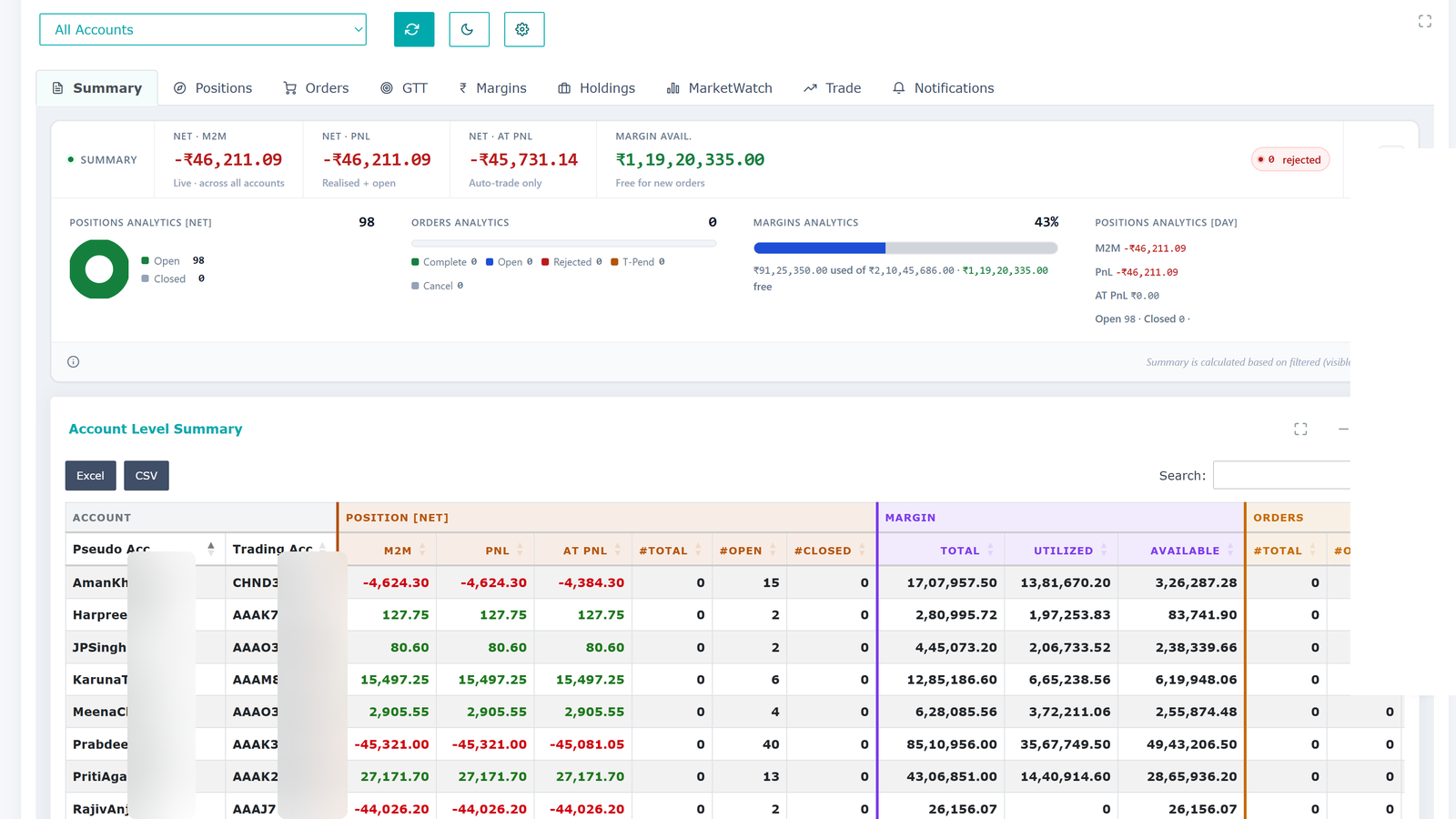
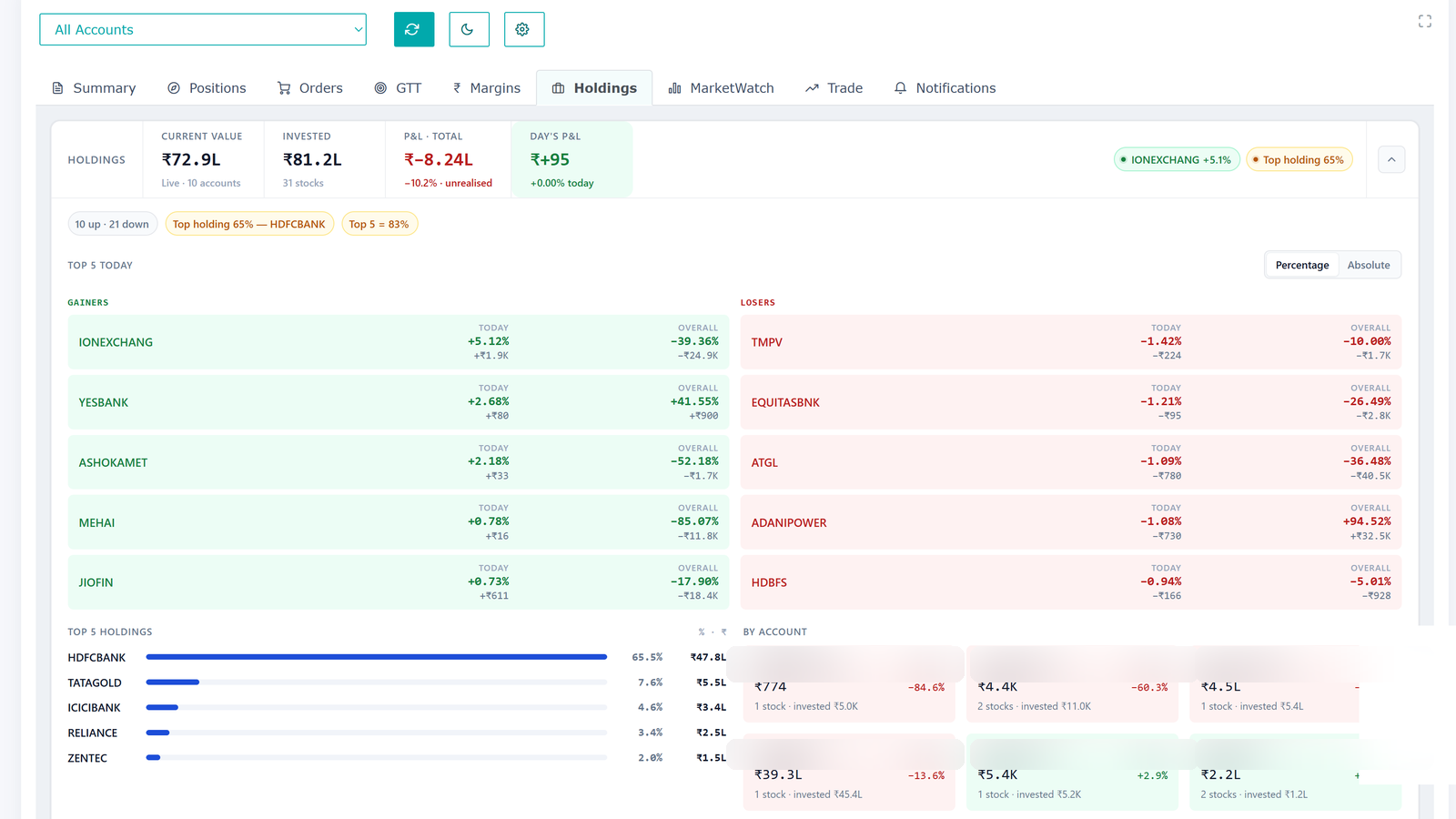
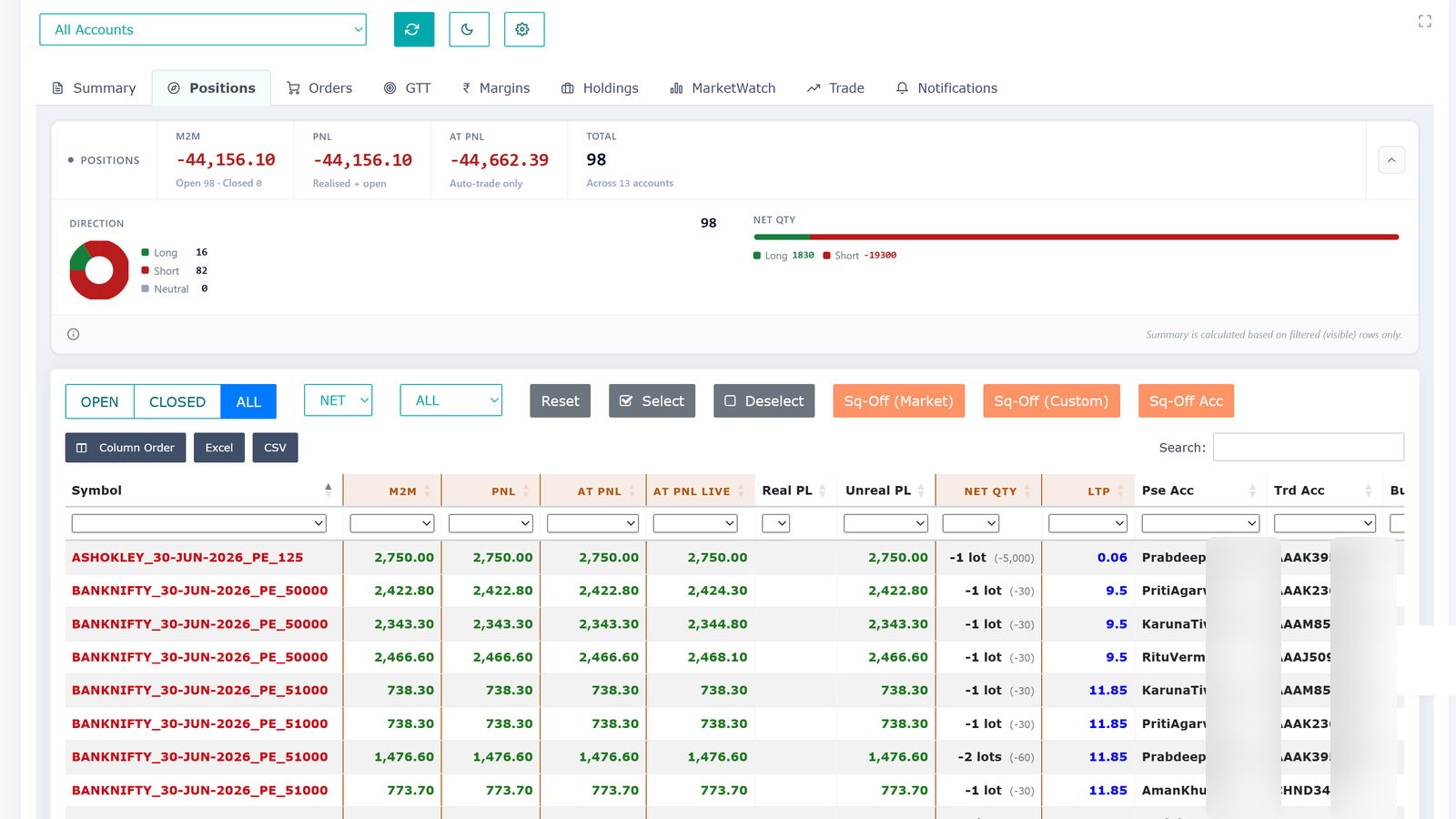
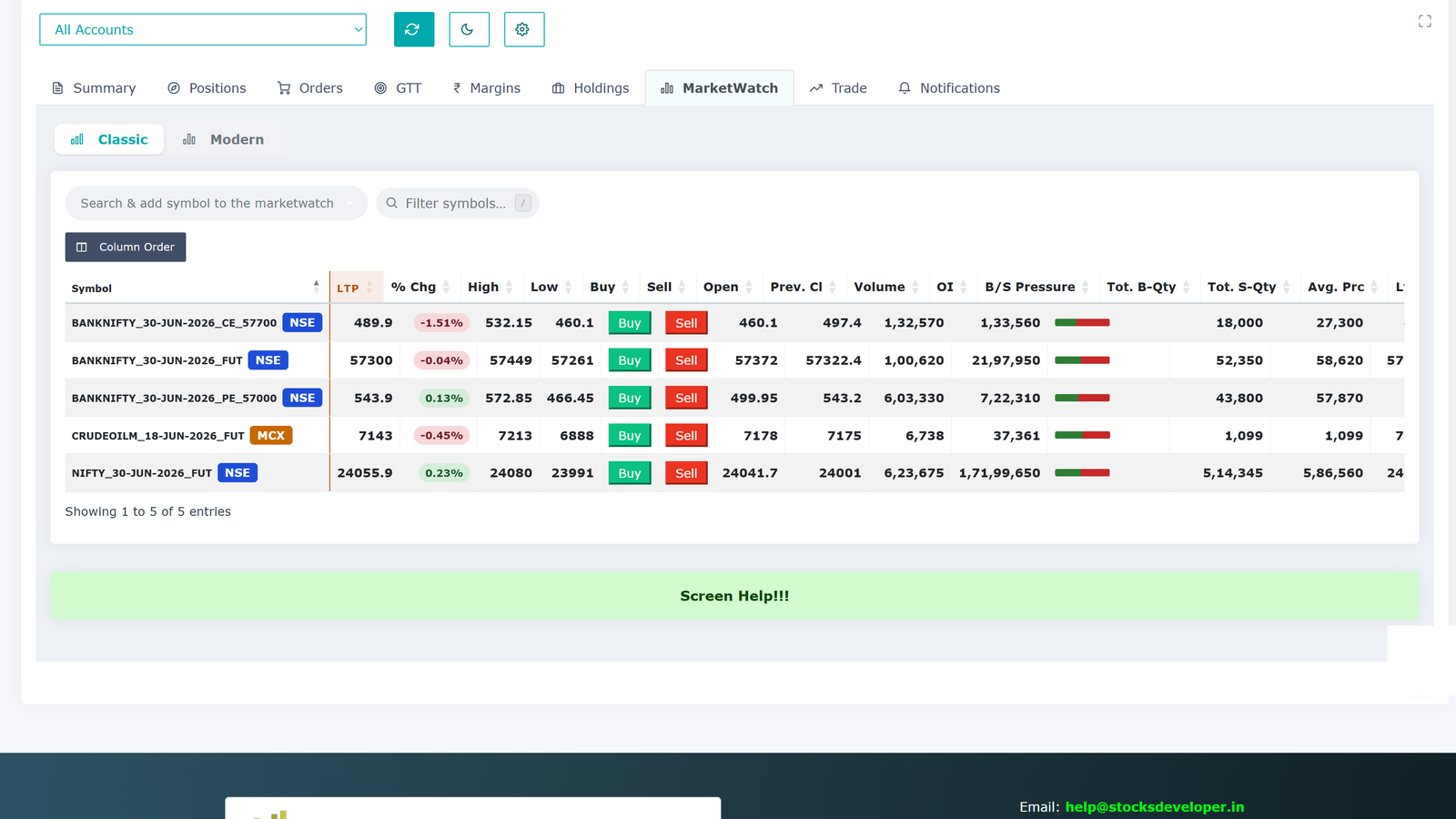
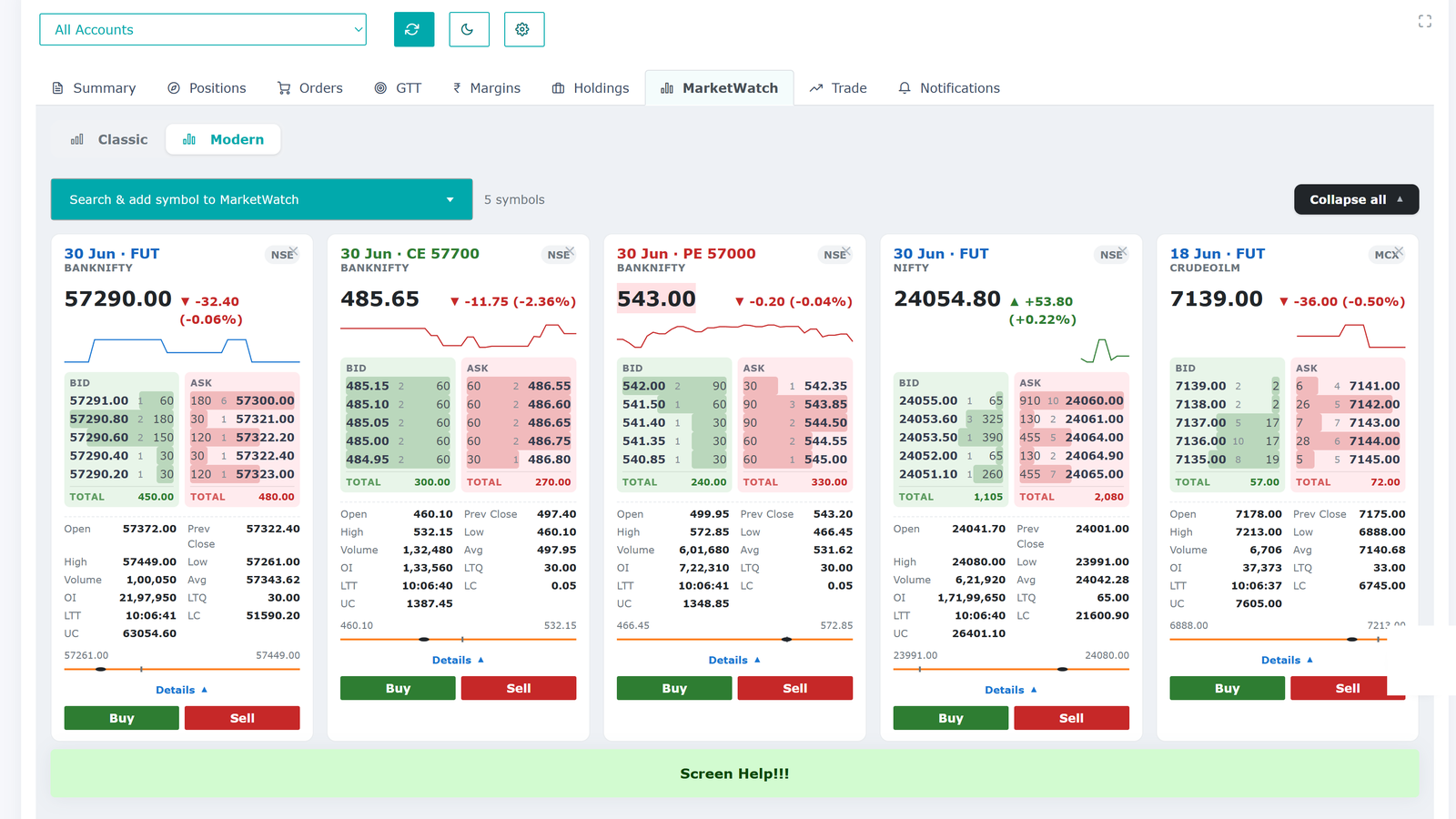
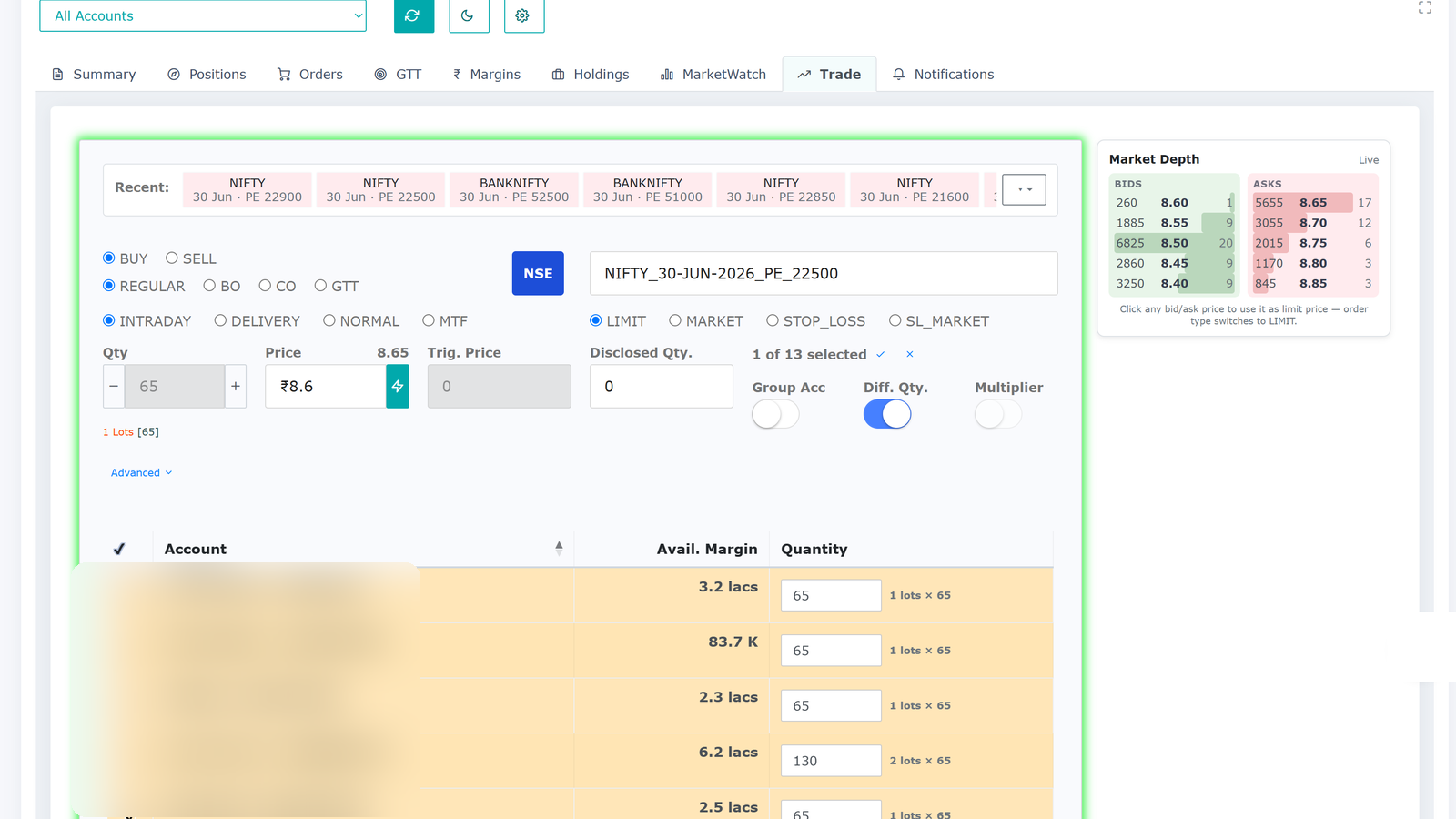
Real screens from the platform — your accounts, live, on one screen.
Options
Build an option strategy once. Place it in every account.
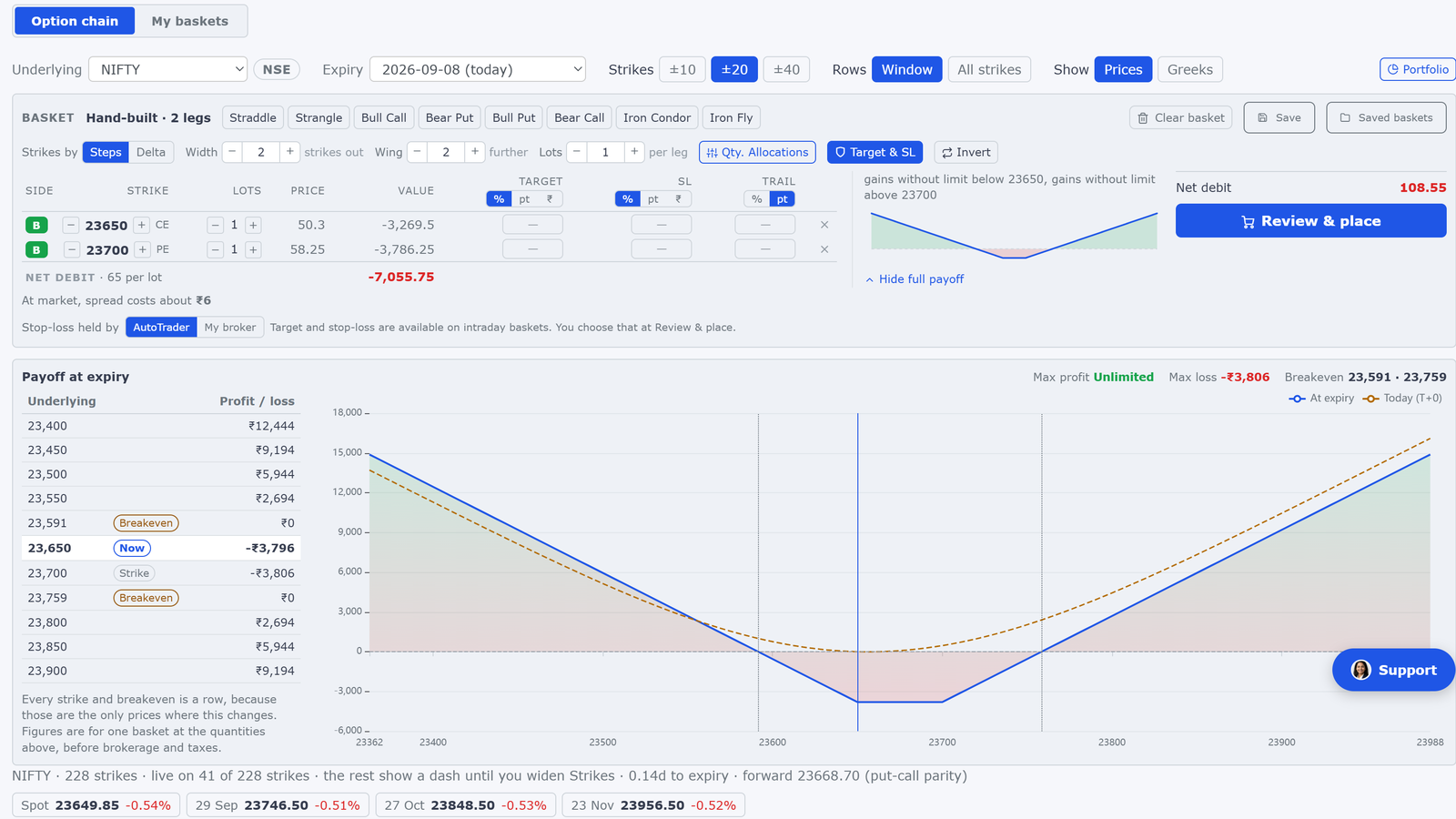
A multi-leg strategy placed by hand is several orders typed one after another, while the prices move under you — and that again for every account you manage. The Options screen turns it into one click.
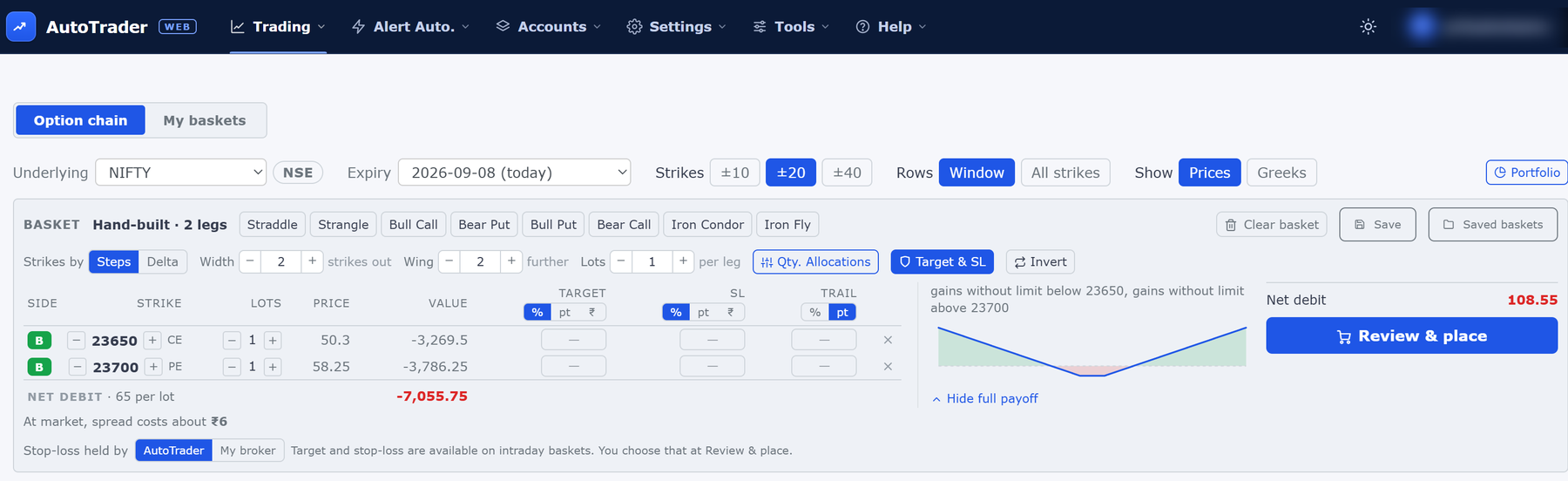
- ✓ Build it on a live option chain — click buy or sell beside a strike, or pick a ready-made shape like a straddle or an iron condor.
- ✓ Place every leg into many accounts at once, each account at its own size.
- ✓ See the payoff before you place — maximum profit, maximum loss and breakeven, plus what crossing the spread will cost.
- ✓ Save a structure and reuse it. It remembers the shape, not the strike numbers, so it re-centres on today's price.
Included in your plan at no extra charge. Check your order book at your broker after you place.
Supported brokers
Connect 40+ Indian brokers. Search for yours below.
It seems we do not support the broker you are looking for, you can request our team to add it.
Plus any broker that supports the Symphony XTS API.
Monitoring many broker accounts is slow and painful
If you trade or manage more than one account, your day starts with a stack of logins. You keep switching between browser windows all day. There is no single place to see how you are really doing. By the time you add it all up by hand, the numbers have already changed.
One real-time screen
Stocks Developer brings every account together. Connect all your broker accounts and see consolidated, real-time P&L, holdings and positions across all of them at once. Live data. No switching tabs and no spreadsheets. When you want to act, you can place and manage orders across one account or many.
By hand vs. one screen
The same daily work, with and without Stocks Developer.
| What you need to do | By hand, account by account | With Stocks Developer |
|---|---|---|
| See total P&L across all accounts | Log in to each account and add it up yourself | ✓Live on one screen, always up to date |
| Check holdings and positions | Switch between broker windows all day | ✓Every account together in one view |
| Place the same order in many accounts | Repeat it by hand, one account at a time | ✓Place bulk orders across accounts at once |
| Replicate a trade across your accounts | Hard to do by hand in time | ✓Replicated across your accounts once you set it up |
| Set GTT orders | Set them up broker by broker | ✓Set across accounts from one place |
| Act on TradingView alerts | Watch alerts and place orders by hand | ✓Your own alerts place orders in your accounts |
| Build your own system | Write separate code for each broker | ✓One broker-independent API works across all |
What makes us different
8+ years in operation · 99.98% uptime · 40+ brokers
Static IPs made easy
A dedicated static IP for any account that needs one, assigned in one click — ₹100 per month for IPv6 or ₹150 per month for IPv4, taxes included. Other tools charge up to ₹500 per month or make you set one up yourself.
Nothing to install. Use it anywhere.
No software to install, no PC setup, no server or VPS to keep running. It works on your computer or phone, from anywhere. Your trading does not depend on your machine staying on.
Cloud vs desktop software compared →Built for speed, and measured
Orders for many accounts are sent at the same time, never one account after another. Measured in live production, an order copied into 20 to 49 accounts reaches all of those brokers within about a fifth of a second. And every order carries a millisecond-level timing report, so you can check the speed yourself instead of trusting a claim.
See the measured numbers →One of the lowest prices in the category
₹295 to ₹495 per account per month, with all taxes included. No setup fee, no hidden charges, and a free 1-month trial on every broker.
40+ Indian brokers, one platform
Connect over 40 Indian brokers and work across all of them with one broker-independent system. One of the widest broker coverages available.
Two ways to copy trade
PMS copy from our terminal and master-child copy in the background, across brokers, with per-account sizing — all set up and controlled by you. Many tools offer only one.
Explore our copy trading software →Your security, your control
Credentials encrypted and stored in India, broker OAuth login and two-factor authentication, portfolio data kept only for support, plus a Kill Switch and a full activity log.
See how we keep you secure →Faster data entry that adapts to you
The order form remembers which accounts and symbols you enter most often and turns them into one-click shortcut chips, so your usual order takes seconds to fill in. It is a data-entry convenience only — it shows you when it has adapted, never suggests what to trade, and never places an order for you.
What you can do
One consolidated view
See live P&L, holdings, positions and orders from every account and every broker on a single screen.
Order replication, two ways
PMS places an order from our terminal into the accounts or groups you choose. Master-child replicates orders from one of your accounts to many in the background. Per-account sizing and segment control included, all set up by you.
Orders and GTT
Place, modify and square-off across many accounts at once, and set GTT orders that go to the exchange when your trigger price is hit.
Multi-leg option strategies
Build a strategy on a live option chain — by hand or from a ready-made shape — see its payoff, and place every leg into many accounts in one click, each at its own size.
Bracket & cover orders, on every broker
Attach a target and a stop-loss to your order, with a stop that follows the price in your favour and never moves back. Works on every broker we support, including brokers that offer no bracket order of their own.
Risk limits with alerts
Set a maximum daily loss or a profit target for each account and get an email alert the moment it is crossed. You stay in control.
MarketWatch
Live watchlists with prices, depth and mini charts, in classic and card views.
TradingView connection
Connect your own TradingView alerts so they place orders in your accounts, on one account or many. You set up the rule, and a free ready-made Pine Script library can build the alerts for you.
APIs for developers
Build once on our broker-independent APIs and your system works across every supported broker.
What traders say
Real messages from traders on our support WhatsApp, shared with names withheld for privacy.
Just verify my P&L for the last 4 years and you will be amazed. In a few weeks I will be managing more than ₹1 crore from your platform only. Your platform is amazing and a life saver.
I am happy to pay for your services. My core work is creating algo strategies and I do not want to go into coding. Really happy with the way you guys are working — your systems are smooth, easy and user-friendly.
You have developed an awesome platform for trading. Most importantly it is very user-friendly and flexible.
I am very happy with the UI and functions, both.
Thanks so much for the quick fix and response. Truly appreciated.
I have trained myself to use your tool efficiently for years.
Feedback-driven
Built with traders, not just for them
Almost everything we ship starts as user feedback. Trigger orders, the new Portfolio dashboard, dark mode and more — all shaped by traders like you. Tell us what you need, and if it helps traders and fits the product, we build it fast.

Support that answers now
Stuck at 2 a.m.? Ask Artha
Artha is our AI support assistant. She knows the whole product documentation, answers in seconds in your own language, and — once you are logged in — can check your own account to tell you what is actually wrong, not just what might be. She resolves about 9 in 10 questions on the spot, and hands you to a person on WhatsApp for the rest.
Artha is an AI assistant, and her picture is AI-generated.
How it works
Connect your accounts
Add your broker accounts. Use OAuth login where your broker supports it.
See everything in real time
All your accounts appear on one screen with live, consolidated P&L, holdings and positions.
Act on your accounts
Place and manage orders, and filter and sort across accounts.
See your whole portfolio on one screen
Connect your accounts and watch everything live. The first month is free on every broker.
Who it is for
Multi-account traders
Trade through several brokers and want one place to watch and act.
Sub-brokers and Authorized Persons
Manage many client accounts and need a fast, consolidated view.
RIAs and portfolio managers
Track holdings and P&L across all client accounts in real time.
Family account managers
Trade for your family or HUF accounts and want them all on one screen.
Systematic and automated traders
Run a TradingView, Amibroker or Python strategy and want it executed across your accounts, hands-off.
Prop desks and trading firms
Oversee many dealer or prop accounts with a live view, bulk actions and a Kill Switch.
Programmers and developers
Want bulk orders or to build your own broker-independent system on our APIs.
Built for trust
You are connecting real broker accounts, so control stays with you.
What we store, and what we don't
Your API credentials are kept only in encrypted form, on servers in India. We keep a record of your portfolio data for a limited period, only so our support assistant and support team can solve your questions and production issues quickly. It is never used for anything else, and never sold. Our system logs are shown transparently to you in your activity log.
Runs on Google Cloud, in India
Our software runs on Google Cloud in its Mumbai, India region — one of the world's most trusted and secure cloud platforms. Being hosted in India means fast, low-latency performance for Indian markets, with strong security and high reliability.
OAuth and 2FA
Log in on your broker's own page where supported, and protect your account with two-factor authentication.
Kill Switch
Broker account owners get a Kill Switch to stop trading at any time.
You stay in control
You set up and control every activity, and you can stop it at any time. We make no trading decisions for you, and our staff cannot trade your account.
Full transparency
A searchable activity log shows every action the system took on your account, with the time and outcome. For each order, you also see a clear timing breakdown — how long our system took and how long your broker's servers took — so you always know where any delay came from. Check anything yourself, any time.
A technology company, not an advisor
Stocks Developer is a technology company. We build software tools that help you watch and work across your broker accounts. We do not give investment advice, tips, recommendations or trading strategies, and we make no trading decisions for you. All trading and investment decisions remain solely your responsibility. You set up and control every activity, and you stay in full control of your accounts.
Common questions
Why choose Stocks Developer?▾
One-click static IPs at a low tax-inclusive price (from ₹100 per month, where other tools charge up to ₹500), nothing to install and use from anywhere on web or mobile, one of the lowest prices in the category with all taxes included, 40+ Indian brokers on one platform, both PMS and master-child copy trading, and security you control. Every new account gets a free 1-month trial, on every broker.
Which brokers do you support?▾
Over 40 Indian brokers, plus any broker that supports the Symphony XTS API. See the full list above.
Is my data safe?▾
Yes. Your Stocks Developer website login password is one-way hashed and can never be read back. Your API credentials are stored only in encrypted form. We keep a record of your orders, positions, holdings and margins for a limited period, only for support: so our support assistant and support team can look into your questions and production issues and fix them quickly. It is never used for anything else, and never sold. The same activity information is shown to you transparently in your activity log.
Where is your software hosted?▾
On Google Cloud, in its Mumbai, India region — one of the world's most trusted and secure cloud platforms. Being hosted in India gives fast, low-latency performance for Indian markets, with strong security and high reliability.
Do you give trading advice or tips?▾
No. Stocks Developer is a software tool only. We do not give advice, tips or recommendations of any kind.
Will you trade my account on your own?▾
No. We make no trading decisions for you. You set up and control every activity, and you can stop it at any time. Our staff cannot place trades.
Can I see whether a delay was caused by your system or by my broker?▾
Yes. For each order you get a clear timing breakdown showing how long our system took and how long your broker's servers took, so you can always tell where any delay came from.
Can I replicate trades across my accounts?▾
Yes, in two ways. PMS places an order from our terminal into the accounts or groups you choose. Master-child replicates orders from one of your accounts to many in the background. You can scale each account and choose which segments are replicated. Both are included in your plan, and you set them up yourself.
What is the difference between PMS copy and master-child copy?▾
With PMS copy you place the order in our terminal and pick the accounts or groups; it is the fastest and shows every result instantly, so it suits manual traders. With master-child you trade in one master account, in our terminal or on your broker's terminal, and we copy it to the child accounts in the background; it suits an algo running in one account or traders who prefer the broker terminal.
Can I connect TradingView to my accounts?▾
Yes. You can connect your own TradingView alerts so they place orders in your accounts, on one account or many. An order is sent only when your alert fires, and you set up the rule yourself.
Can I run a TradingView, Amibroker or Python strategy across all my accounts?▾
Yes. You connect your own strategy from TradingView, Amibroker or our API, and when your strategy sends a signal, the order is placed across the accounts you choose. The signal comes from your own setup, which you configure and control, and you can stop it at any time.
Is there an API for programmers?▾
Yes. One broker-independent API works across every supported broker, with SDKs for Java, Python, C# and Excel.
Can I place many orders at once?▾
In the web app you place one order into one or more accounts at a time. To send many orders in one go, we provide a separate Excel tool that places them all at once into one or more accounts across brokers.
Can I place a multi-leg option strategy across many accounts?▾
Yes. The Options screen shows a live option chain. You build the structure once — by clicking buy or sell beside a strike, or by picking a ready-made shape such as a straddle or an iron condor — and then place every leg into as many of your accounts as you like in a single click, each account at its own size. Before you place, it shows the payoff at expiry with the maximum profit, the maximum loss and the breakeven, and what crossing the spread is likely to cost. It is included in your plan at no extra charge.
How much does it cost?▾
Between ₹295 and ₹495 per account per month, inclusive of all taxes. Every broker needs a static IP, a small add-on: ₹100 per month for IPv6 or ₹150 per month for IPv4, taxes included — or, on IPv4 brokers, bring your own IP for free. Every new account gets a free 1-month full-feature trial, on every broker.
Do I get a static IP, and can I use my own?▾
Yes. Each account can get a dedicated static IP, assigned for you in one click — you just whitelist it with your broker. It costs ₹100 per month for IPv6 or ₹150 per month for IPv4, inclusive of all taxes — the first month is charged from your wallet when the IP is assigned, and after that it renews every month, from your wallet or with your account recharge. A static IP belongs to one account, so each account that uses a static IP is billed for its own. Many other tools charge up to ₹500 per account per month for this or make you set up a proxy yourself. On an IPv4 broker you can use your own IP instead — we never charge for an IP you bring. It is not offered on IPv6.
Does the order form adapt to how I use it?▾
Yes — as a simple data-entry convenience, nothing more. The order form remembers which accounts and symbols you enter into it most often and shows them as one-click shortcut chips, so filling in your usual order gets faster. It looks only at your own form entries in our app: it does not study your trading strategy, it never suggests what to trade, and it never places an order on its own. The form clearly shows you when it has adapted, and every order is still filled in, reviewed and sent by you.
Can you add a feature I need?▾
Often, yes. We have a rapid development cycle, so when users ask for a new feature or a change, we can build and ship it quickly. Requests are subject to approval, but if it helps traders and fits the product, we move fast.
Try it free for one month
Connect your accounts and see your whole portfolio on one screen. The first month is free on every broker. Your broker will also need a dedicated IP address to accept API orders. Buy one from us, or bring your own on an IPv4 broker.
Sign up free