Options Trading Software for Indian Brokers
Build a multi-leg option strategy on a live chain, see its payoff, and place every leg into many accounts in one click — included in your plan.
- Build a multi-leg option strategy on a live chain — click B or S beside a strike, or pick a ready-made shape such as a straddle or an iron condor.
- Place every leg into many accounts in one click, each account at its own size. Save the set of accounts and their sizes and reuse it.
- See the payoff before you place — maximum profit, maximum loss and breakeven, with every leg priced at what it will really trade at.
- A target, stop-loss and trailing step on each leg, on every broker we support — including brokers with no such order of their own.
- Save a structure and reuse it. It remembers the shape, not the strike numbers, so it re-centres on today's price.
- Included in your plan at no extra charge, across 40+ Indian brokers. Tools-only — you choose the strategy and you click Place.
What is options trading software?
Options trading software lets you work with an option strategy instead of with single orders. A strategy is made of several options bought and sold together — its legs. Placed by hand, that is several separate orders, typed one after another, while the prices move under you. Placed across more than one account, it is that many orders again.
Stocks Developer gives you one screen for the whole job. You build the structure once on a live option chain, check what it is worth and what it can lose, and then place every leg into every account you choose in a single click.
It is a tools-only platform. You choose the strategy, the strikes and the size. Nothing is sent until you click Place.
Build the strategy on a live option chain
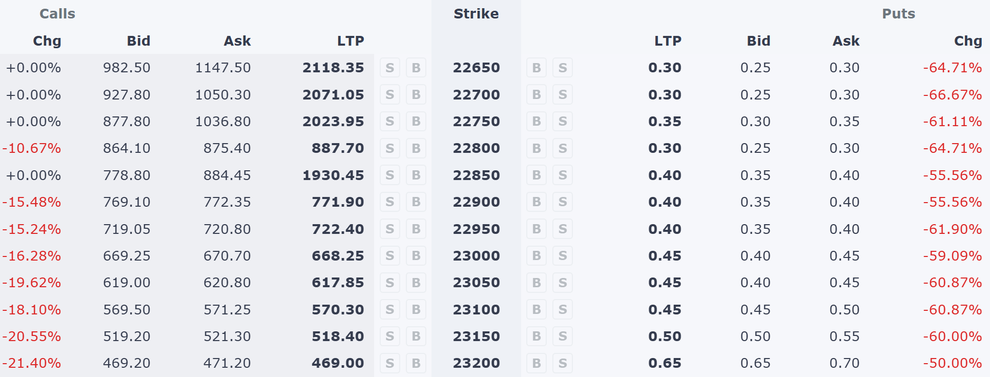
The chain updates in real time. Pick the underlying and the expiry at the top, then build the structure the way that suits you:
- Click B or S beside a strike. Buy or sell, one click each, exactly the strikes you want.
- Or pick a ready-made shape — a straddle, a strangle, an iron condor and others. The screen builds the legs around the current price for you. The shapes are shapes, not recommendations.
Every leg you add appears in a basket under the chain, with its own live price and value.
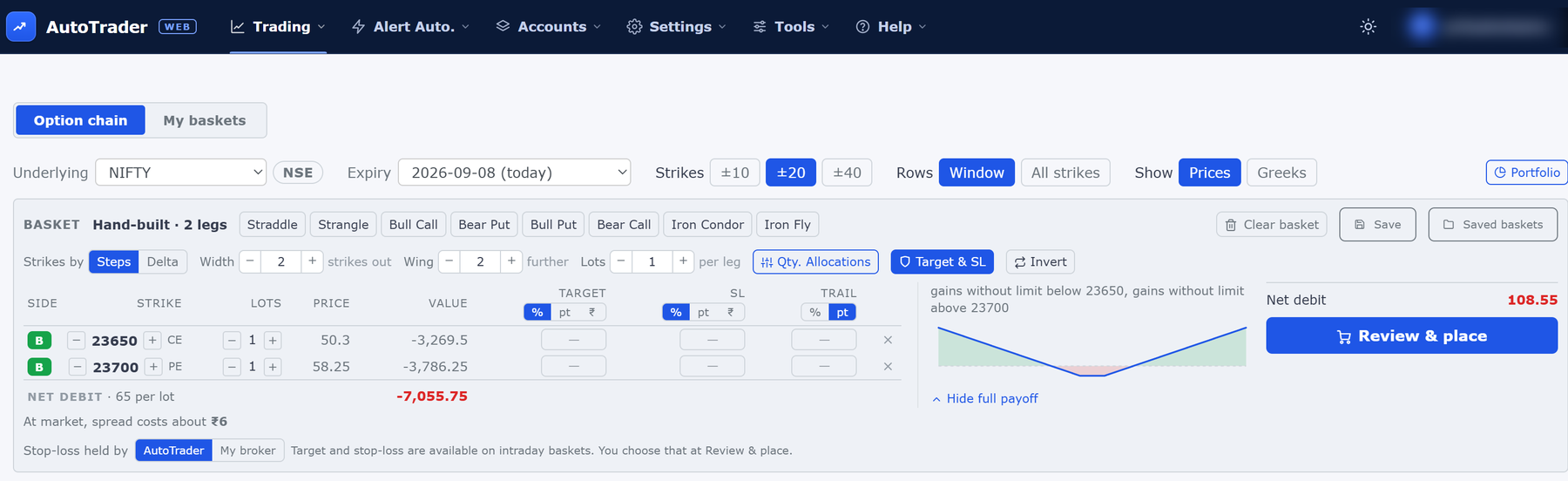
The whole screen at a glance — click any picture on this page to see it full size.
Once a leg is on the basket, a minus and a plus button beside it walk it to another strike. You do not have to delete the leg and start again, and the rest of the structure stays exactly as it is.
Place every leg into many accounts at once
This is the part that is hard to do by hand and easy here.
When the structure is ready, Review and place opens one window listing your accounts. Tick the accounts that should trade it, give each one its own size, and place. One click sends every leg into every ticked account.
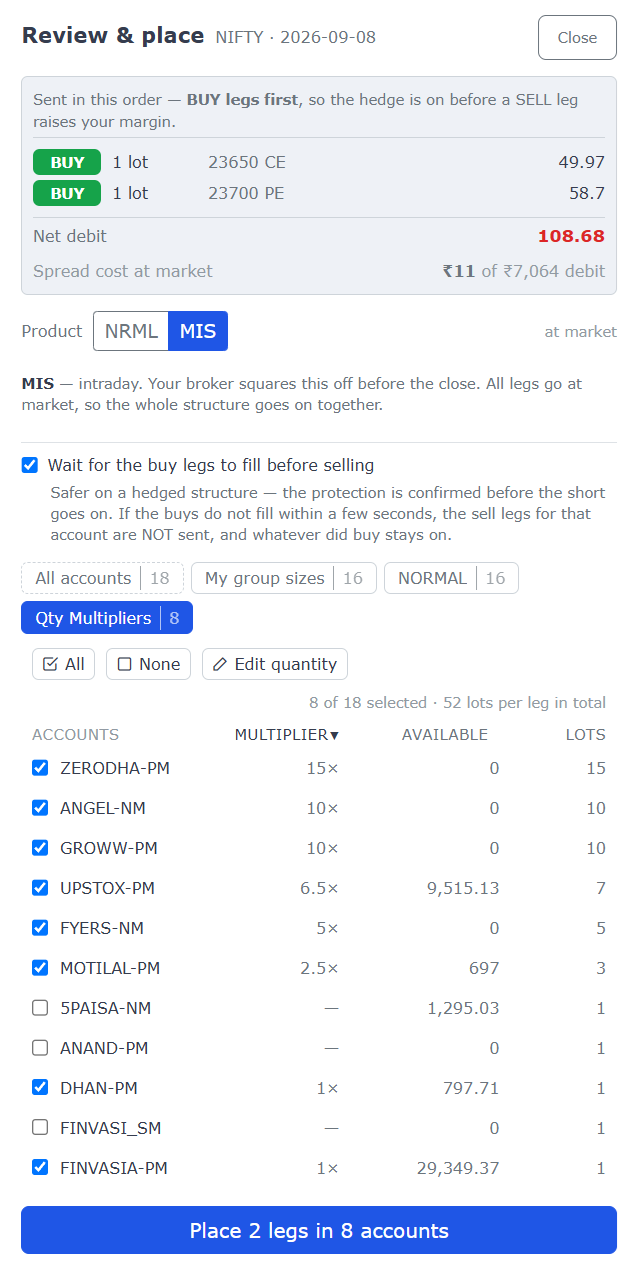
Those accounts can be at different brokers. The platform is broker-independent, so one click can put the same structure into accounts at eight brokers at once.
Each account shows the available margin your broker reports for it, so you can see which accounts have room before you commit. Each account is placed independently, so a problem in one never stops the others.
If you trade the same set of accounts at the same sizes often, save it as a named allocation. Next time it is one click.
See the payoff before you place
As the structure comes together, the screen works out its payoff at expiry: the profit or loss at a range of underlying prices, with the maximum profit, the maximum loss and every breakeven called out.
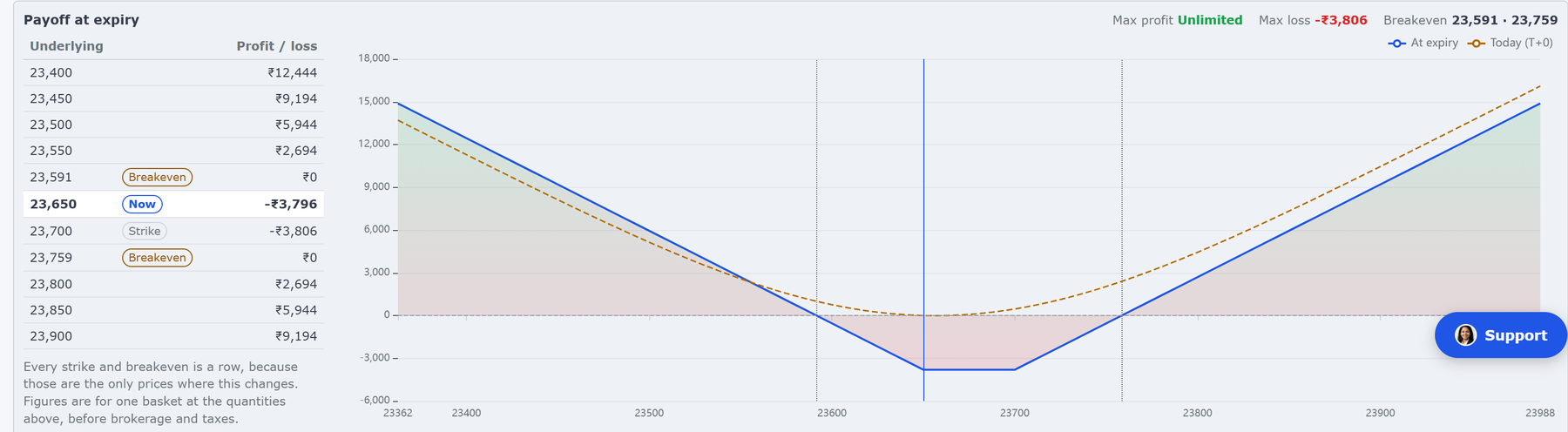
The chart draws two lines: what the structure is worth at expiry, and where it stands today. Every strike and every breakeven gets its own row in the table beside it, because those are the only prices where the answer changes.
Where a structure has no cap on one side, the screen says Unlimited rather than printing a figure that would not be true. That is a real answer, not a missing number — it is what a sold option with nothing bought beyond it actually means.
These figures are arithmetic on the prices your legs show right now. They are not a forecast, and they are not advice.
The price you see is the price you will get
Every leg goes in at market, so every leg is priced at the side of the market it will really cross. A leg you are buying shows the price sellers are asking. A leg you are selling shows the price buyers are bidding.
That is often a little different from the last traded price you see in the chain, and that difference is the point. The last traded price is what somebody else got, earlier. The price on your leg is what you will pay or receive now.
The gap between the buying and the selling price is a real cost, and on a thinly traded strike it is real money. Because that cost is already inside the prices on your legs, the screen tells you how much of them it is, in rupees, before you place. Each leg also carries a plain tag when it needs one — wide, very wide, not traded or no quote.

It warns, it never blocks. A far out-of-the-money leg is legitimately wide, and you may have a good reason for it. The screen’s job is to make sure the cost is not a surprise.
Buy legs go before sell legs
Whatever order you built them in, the bought legs are always sent first.
The reason is margin. The bought leg is the one that caps your risk, and the sold leg is the one that raises what your broker needs. Sending them the other way round would leave a defined-risk structure briefly standing as a naked short. You do not have to think about it — the screen simply does it.
You can go one step further and tick wait for the buy legs to fill before selling. Then the sell legs go only once the protection is confirmed on. If the buys do not fill within a few seconds, the sell legs for that account are not sent at all, and whatever did buy stays on. It is checked by default, and you can clear it.
A target and a stop-loss on each leg
Each leg can carry its own target, stop-loss and trailing step. It is optional, and most structures use none of it.
You set the unit once for the whole column — a percentage of the fill price, a distance in points, or an exact price. Then you decide who holds the stop-loss:
- Your broker — a real stop order rests at your broker.
- Our platform — we watch the price and send the exit when your level is hit. This works on every broker we support, including brokers that offer nothing like it themselves, and it is the only choice that can trail.
Per-leg protection is available on intraday structures. The screen checks the combination before it lets you place, and says plainly what needs changing.
Save a strategy and reuse it
Save a structure with a name and one click loads it back onto the chain.
What it saves is the shape, not the strike numbers. A leg is remembered as something like the call two strikes out of the money, so a structure saved last week comes back centred on this week’s price instead of on strikes the market has already walked away from. If you do want one leg pinned to an exact strike, there is a tick box for it.
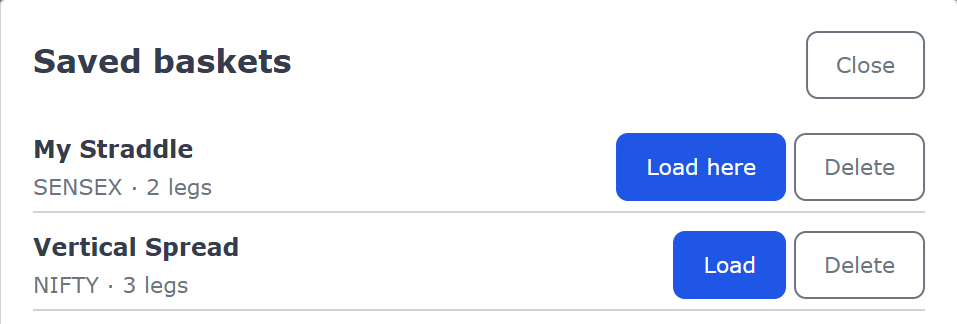
Saving never places anything. Neither does loading. Placing is always the Review and place step, and always your click.
What it costs
Nothing extra. The Options screen is part of your plan, on every account, with nothing to switch on.
You pay only the normal account price — ₹295 to ₹495 per account per month, inclusive of all taxes — and every new account gets a free 1-month trial on every broker. Every broker needs a static IP. It is a small tax-inclusive add-on from ₹100 per month, or, on IPv4 brokers, you can bring your own for free.
See the pricing page for the full details.
Start small, and check your order book
The Options screen is open to every user. It sends real orders to your live accounts, and an order cannot be taken back once it is sent.
So check your order book at your broker after you place a structure, and the first time, start with a small size on one account before you use it for real size. There is a Send feedback button at the foot of the screen, and what it sends decides what gets built there next.
What this screen does not do
- It does not decide what to trade. You choose the strategy, the strikes and the size.
- It does not tell you whether a structure is a good idea, or suggest a strike, an expiry or a size. The ready-made shapes are shapes you can pick from, not recommendations.
- It does not place anything on its own. Nothing is sent until you click Place.
- It does not work out your margin requirement. It shows the available margin your broker reports, so you can see which accounts have room. What a structure actually needs is decided by your broker and the exchange.
- It does not close the structure for you. You square off when you decide to.
New to options? Option terms explained covers call and put, strike, expiry, lot size, premium, breakeven and the common multi-leg shapes in plain English.
Frequently asked questions
Can I place a multi-leg option strategy across several accounts at once?▾
Yes. You build the structure once on a live option chain — by clicking B or S beside the strikes you want, or by picking a ready-made shape such as a straddle or an iron condor — and then place every leg into as many of your accounts as you like in a single click. Each account can trade a different size, and you can save a named set of accounts and their sizes so the same set-up is one click away next time.
Does options trading software cost extra?▾
No. The Options screen is included in your plan at no extra charge, and there is nothing to switch on. You pay only the normal account price of ₹295 to ₹495 per account per month, inclusive of all taxes, and every new account gets a free 1-month trial on every broker.
Can I see the profit and loss of an option strategy before I place it?▾
Yes. As you build the structure, the screen shows its payoff at expiry — the profit or loss at a range of underlying prices, along with the maximum profit, the maximum loss and every breakeven. Every leg is priced at what it will really trade at, so those figures already allow for the gap between the buying and the selling price, and the screen tells you in rupees how much of the total that gap is. These are arithmetic on the prices your legs show right now, not a forecast and not advice.
In what order are the legs of an option strategy placed?▾
Buy legs are always placed before sell legs, whatever order you added them in. This is deliberate: the protective bought leg goes on before the sold leg that raises your margin requirement, so a defined-risk structure is never left briefly as a naked short. You do not have to be careful about the order you build in.
Can I set a stop-loss on each leg of an option strategy?▾
Yes, and it is optional — most structures use none of it. Each leg can have its own target, stop-loss and trailing step, set as a percentage, as points, or as an exact price. You choose who holds the stop-loss: your broker, as a resting order, or our platform, which works on every broker we support and is the only choice that can trail. Per-leg protection is available on intraday structures.
Can I save an option strategy and use it again later?▾
Yes. Build it once, save it with a name, and one click loads it back. It stores the shape of the structure rather than the strike numbers — a leg is remembered as something like the call two strikes out of the money — so when you load it next week it rebuilds around the current price instead of on strikes the market has already left behind. If you want one leg to keep an exact strike, there is a tick box for that. Saving never places anything, and neither does loading.
What happens if one leg of my option strategy fails to place?▾
Each account is placed on its own, so a problem in one account never stops the others. Inside an account the legs go in order, and if one is refused that account stops there and is reported as only partly placed. The result window names every account and says what happened in each, so you can see exactly where you are holding an incomplete structure. Check your order book at your broker and complete or close that account by hand.
Which brokers does the options screen work with?▾
All 40+ Indian brokers we support. The platform is broker-independent, so the same structure can be placed into accounts at several different brokers in the same click, and per-leg protection held by our platform works even on brokers that offer no such order of their own. Commodity option contracts are supported too.
Next steps
Thanks for the feedback. Still stuck? Contact support.
Last updated 17 October 2026
