Everything you can do with Stocks Developer
Watch every Indian broker account on one screen, then act. Monitor live P&L, place and manage orders across accounts, run bulk orders, or build on the APIs.
See it in action
Real screens from the platform — monitor, watch and trade across every account.
In short
Stocks Developer puts every Indian broker account on one screen. You get live, consolidated P&L, holdings, positions and orders across all accounts, plus MarketWatch, bulk orders, order replication across your accounts, GTT orders, multi-leg option strategies built on a live option chain and placed into many accounts at once, and broker-independent APIs for programmers. It is a tools-only platform: no advice, no tips, and it makes no trading decisions for you. Over 40 Indian stock brokers supported.
Monitoring
Explore the portfolio screen →One real-time screen for every account and every broker.
Consolidated dashboard
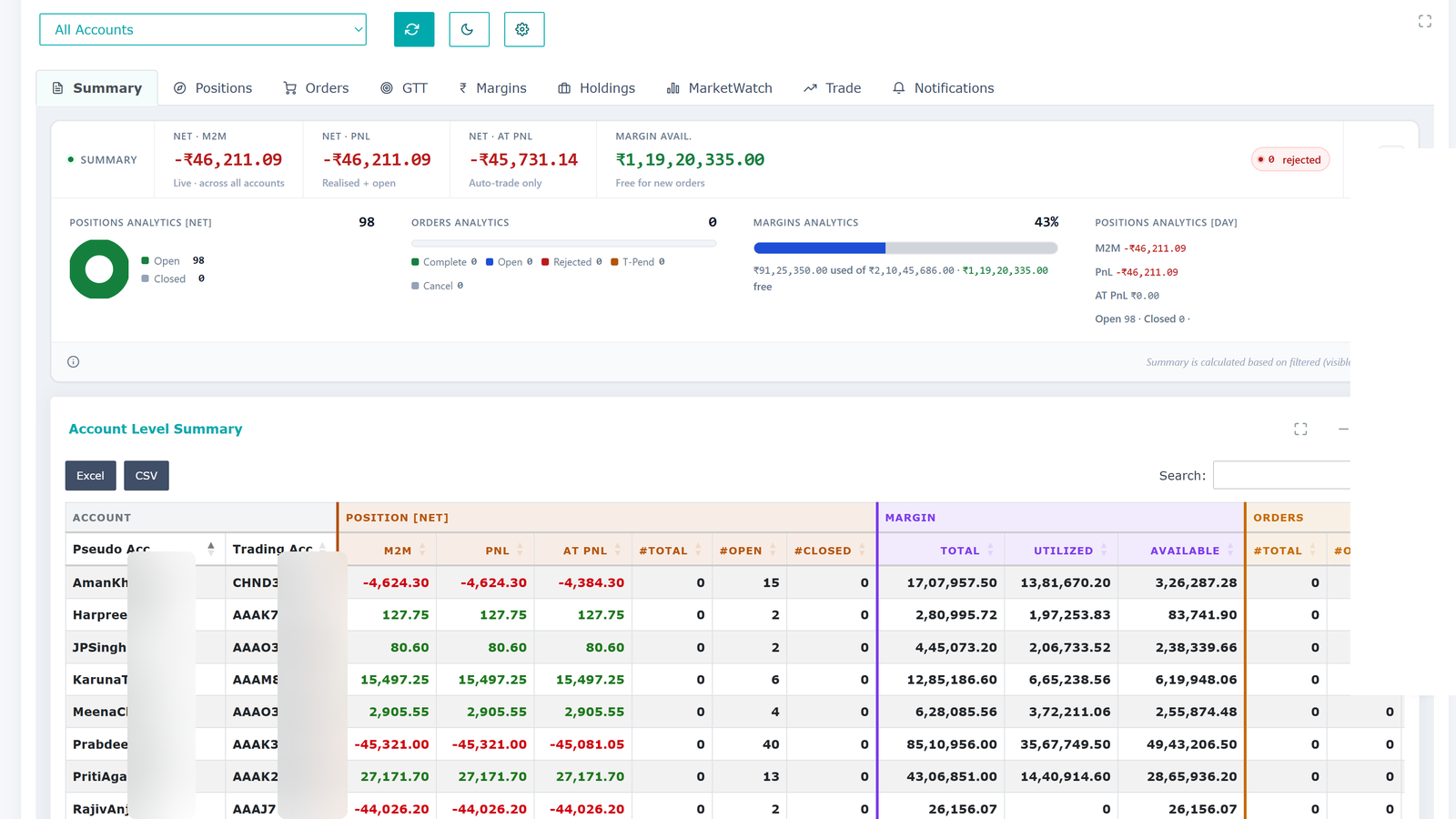
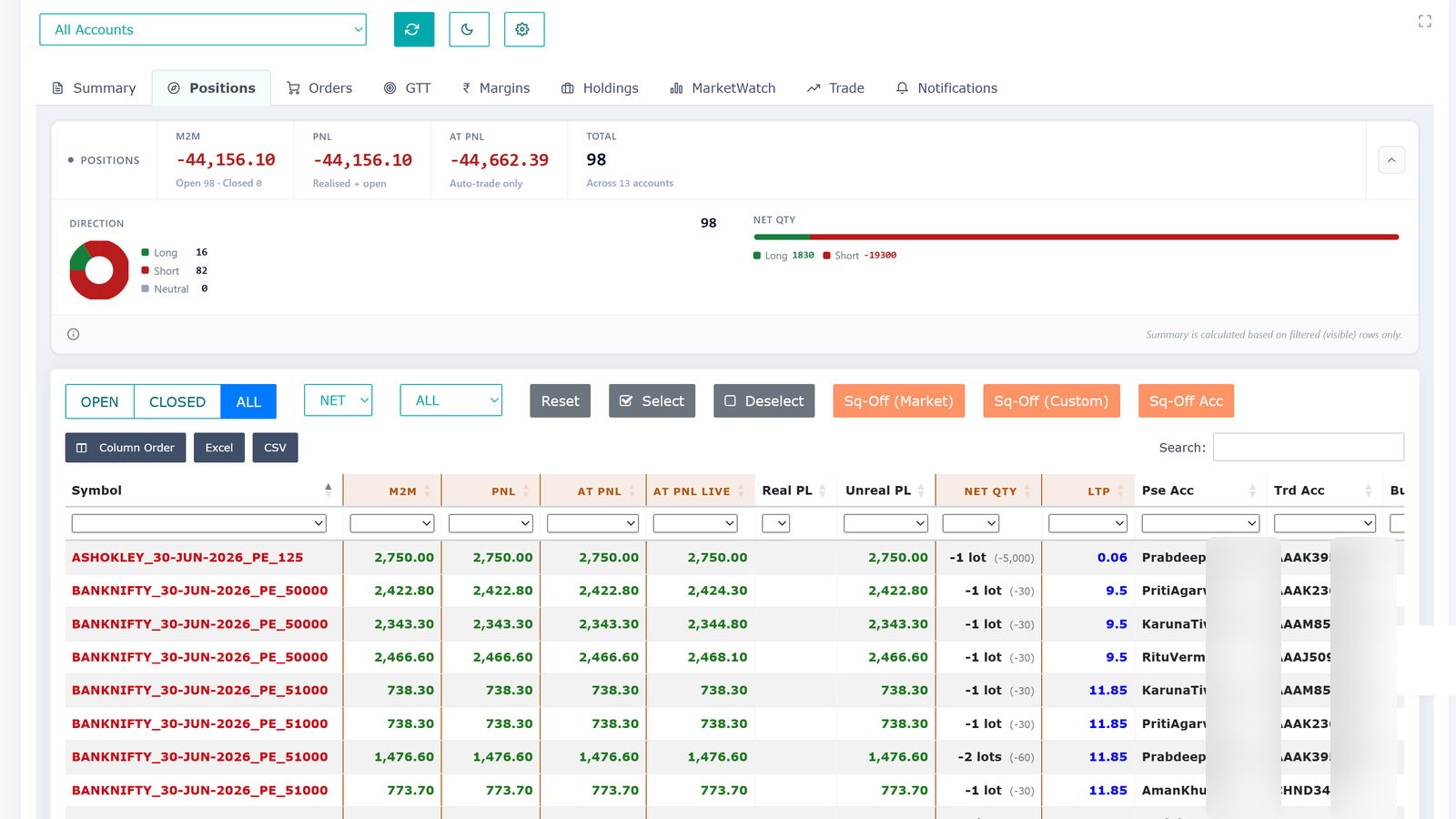
P&L, holdings, positions, orders and margins from every account and broker on one screen.
Live ticking prices and P&L
Prices and profit or loss update in real time, with live running totals in the footer.
Holdings with live value
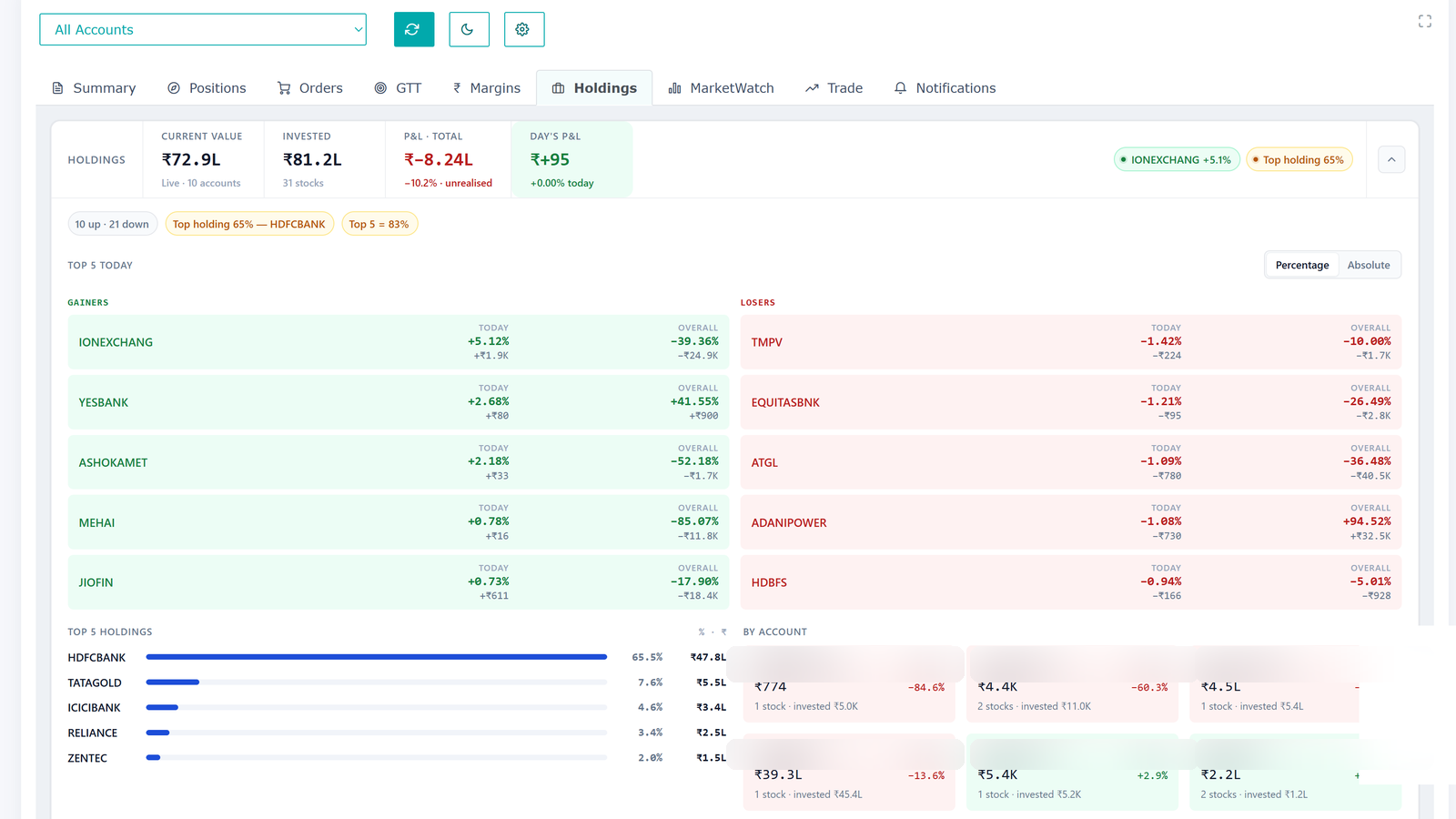
See quantity, average price and live valuation for each holding, with a running total.
Margins and funds
Available buying power per account or group, refreshed after every order action.
Live order book
Order status at a glance. When an order is rejected you see the real broker message, not a generic one.
Summary panels
Invested versus current value, day's P&L, best and worst performers, concentration alerts and a per-account breakdown. Respects your filters.
Lots, status pills and frozen headers
Quantity shown in lots for F&O, colour-coded status pills, frozen headers while scrolling, column reorder, and sort and filter settings saved per user.
Activity logs
A clear, searchable record of what the system did on your behalf, with the time and outcome of each action. Look into things yourself instead of waiting on support.
Activity logs guideCopy trading
Compare PMS vs master-child copy →Two ways to copy orders across accounts, both included in your plan: PMS copy, where you place from our terminal into the accounts or groups you choose, and master-child, where you trade in one account and we copy the rest in the background.
PMS copy
Place an order once in our terminal and it goes to all the accounts or groups you choose. You see every result on the spot, so you can fix any issue at once. This is the fastest way to copy, with almost no lag.
PMS copy guideMaster-child copy
Trade in one master account, in our terminal or directly on your broker's terminal, and the order is copied to the child accounts in the background. Best when an algo trades your master account, or you prefer your broker's own terminal. Master and child can be on different brokers.
Master-child guidePer-child quantity
Scale each child account by a multiplier. Quantities are rounded to valid lot sizes for you.
Quantity multiplier guideSegment control
Choose which segments are copied, such as cash, F&O or commodity, and skip the rest.
Copy time windows
Set the times of day when copying is active.
Sequential or parallel
Copy one child at a time to keep multi-leg order sequence, or copy all at once for speed.
Safety checks
Outdated or very late orders are not copied, so children do not act on stale signals.
Copy trace
For any master order, see exactly how it copied to each child account: what succeeded or failed and why, with the quantity and multiplier used for each. Easy to read, so you can check a copy yourself.
Account groups
Group accounts guide →Organise your accounts into groups, then trade and monitor them as one.
Group accounts your way
Put accounts into groups by capital (for example a ₹10 lakh group and a ₹20 lakh group), by broker, or by your own category such as cash, F&O or commodity accounts.
Quantity multiplier per group
Give each group a multiplier and the right quantity is worked out for every account in it, rounded to valid lot sizes. Size a ₹20 lakh group at twice a ₹10 lakh group in one step.
Quantity multiplier guideTrade and monitor by group
Place an order into a whole group at once, and filter your dashboard, P&L and margins by group so you read each set of accounts on its own.
MarketWatch
Explore MarketWatch →Live watchlists, the way you like to read them.
Live watchlists
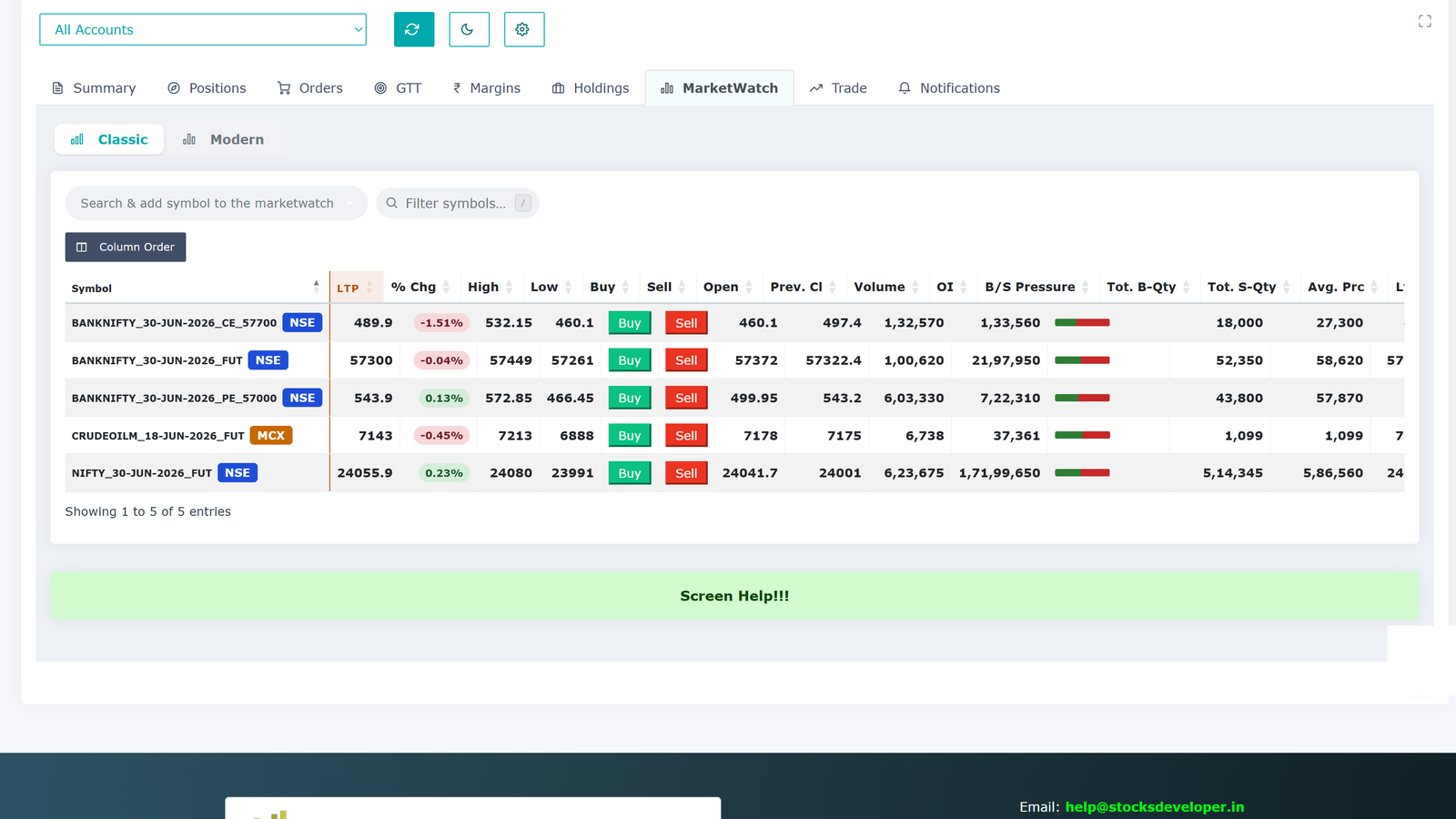
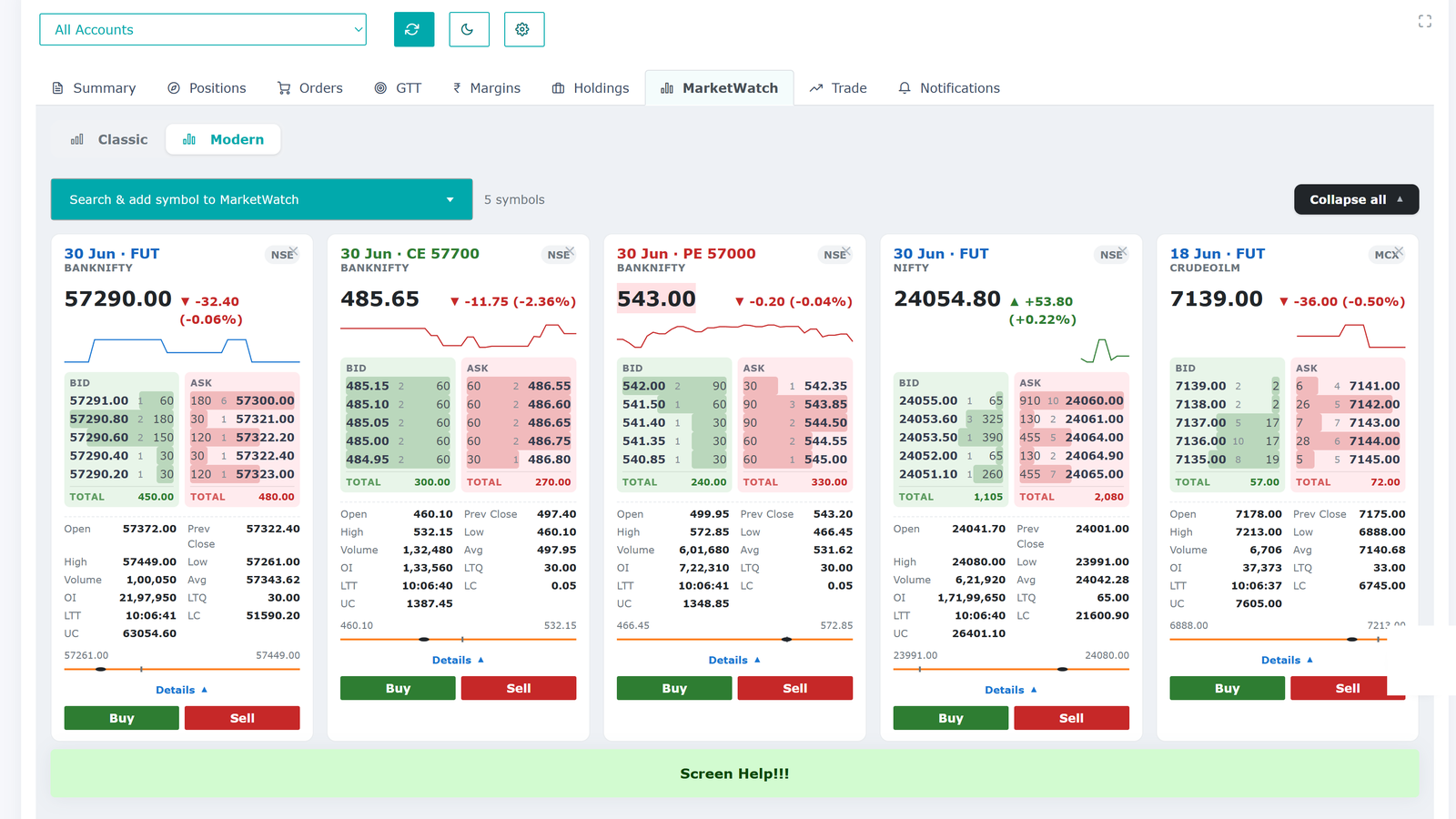
Track up to 60 symbols with live prices and percentage change, in a classic list or a card view, both in one tab.
Depth and charts at a glance
Each symbol shows a mini chart and a live bid and ask depth view, so you read the market without opening another screen.
Pin, reorder and filter
Pin symbols, drag to reorder, and type to filter instantly to find what you need.
Trading actions
See the trade screen guide →Act on one account or many at once. Every order is placed by you.
Place orders
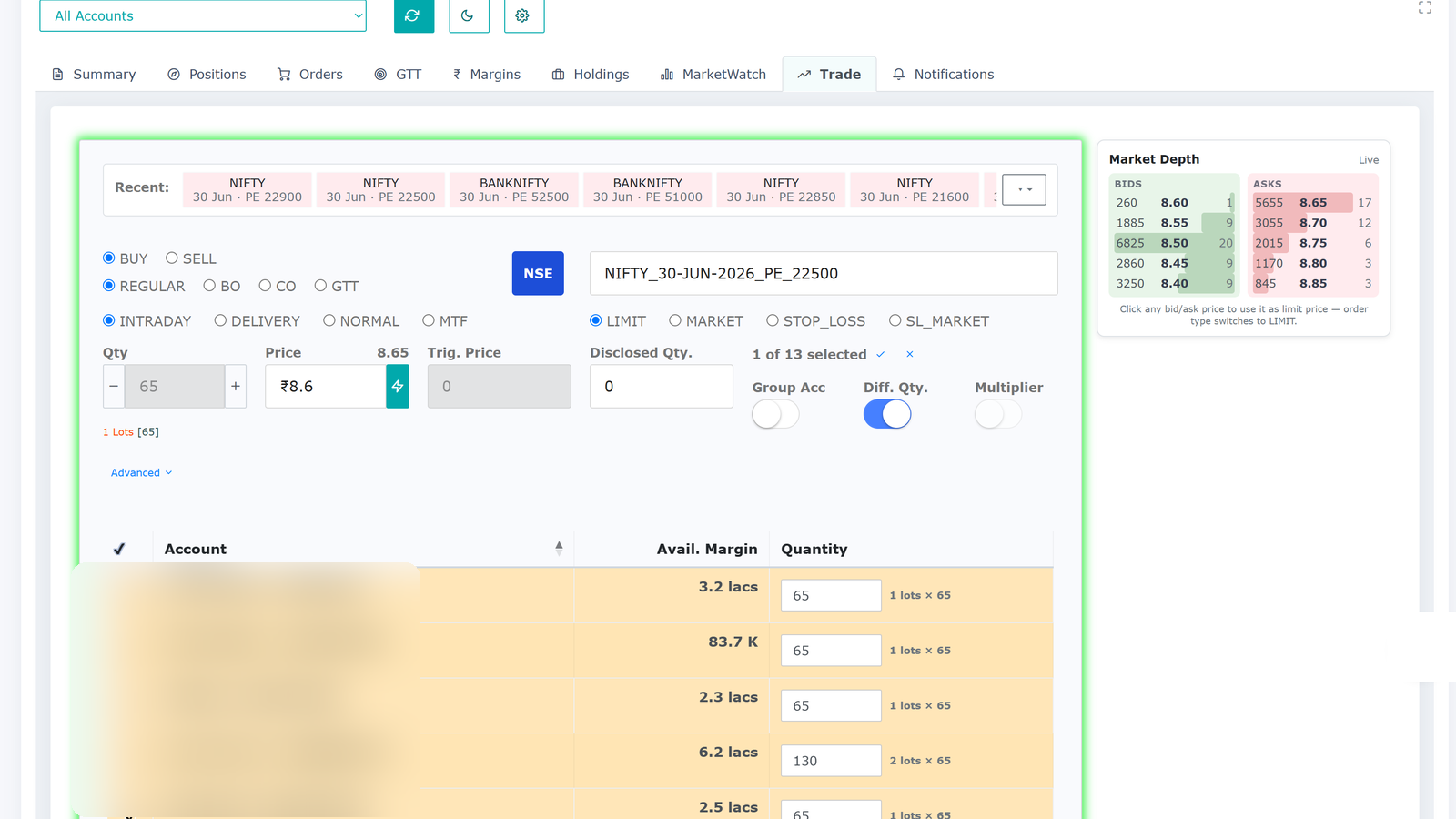
Market, limit, stop-loss and after-market orders, on a single account or across many at once.
Bulk orders
Place, modify, cancel or square-off across many accounts in a single action.
Square-off
Close one position or a whole portfolio, with the option to cancel its open orders in the same step.
GTT orders
Set a trigger price once and the order goes to the exchange when it is hit. Single and OCO (one cancels other). View, modify and cancel from the portfolio screen.
GTT orders guideBracket and cover orders on every broker
Place an order with a target and a stop-loss attached, and a stop that follows the price in your favour and never moves back. Ours work on every broker we support, including brokers that offer no bracket or cover order of their own. Your broker's own bracket and cover orders are still there too, where they are supported.
Bracket & cover orders guideOrder-form shortcuts
Available margin on the form, one-click fill LTP, live turnover preview, lots hints with an invalid-lot warning, a market depth ladder, a large-order confirmation, a recent-symbols shortcut, and Place Similar to re-place an order in one click.
An order form that learns your data-entry habits
The Trade tab remembers which accounts and symbols you enter most often and shows them as one-click shortcut chips, so your usual order takes seconds to fill in. It is a data-entry convenience only: it tells you when it has adapted, it does not study your trading strategy, it never suggests what to trade, and it never places an order for you.
Keyboard-first fast entry
Work at desktop speed from the keyboard: shortcuts to set the side, order type and price, an optional Keyboard mode to move through table rows and act with single keys, and a Ctrl+K command box to jump to a symbol or prepare an order. Every order is shown for you to review and send — nothing is sent for you.
Keyboard shortcuts guideOrder slicing
Split large orders, including automatic splitting to stay within exchange freeze limits.
Market Price Protection
When the exchange is not accepting market orders, the system can place a protected limit order for you, so your order still goes through. You choose how aggressive it is.
Market Price Protection guideBulk result viewer
After a bulk action, results are grouped with a plain-English reason and a help link when an order does not go through.
Trailing stop-loss and disclosed quantity
Set a stop-loss that trails the price, or show only part of your order quantity to the market. The trailing stop works on every broker through our own bracket and cover orders.
Build a multi-leg option strategy on a live chain and place every leg into many accounts in one click. Included in your plan at no extra charge.
Live option chain
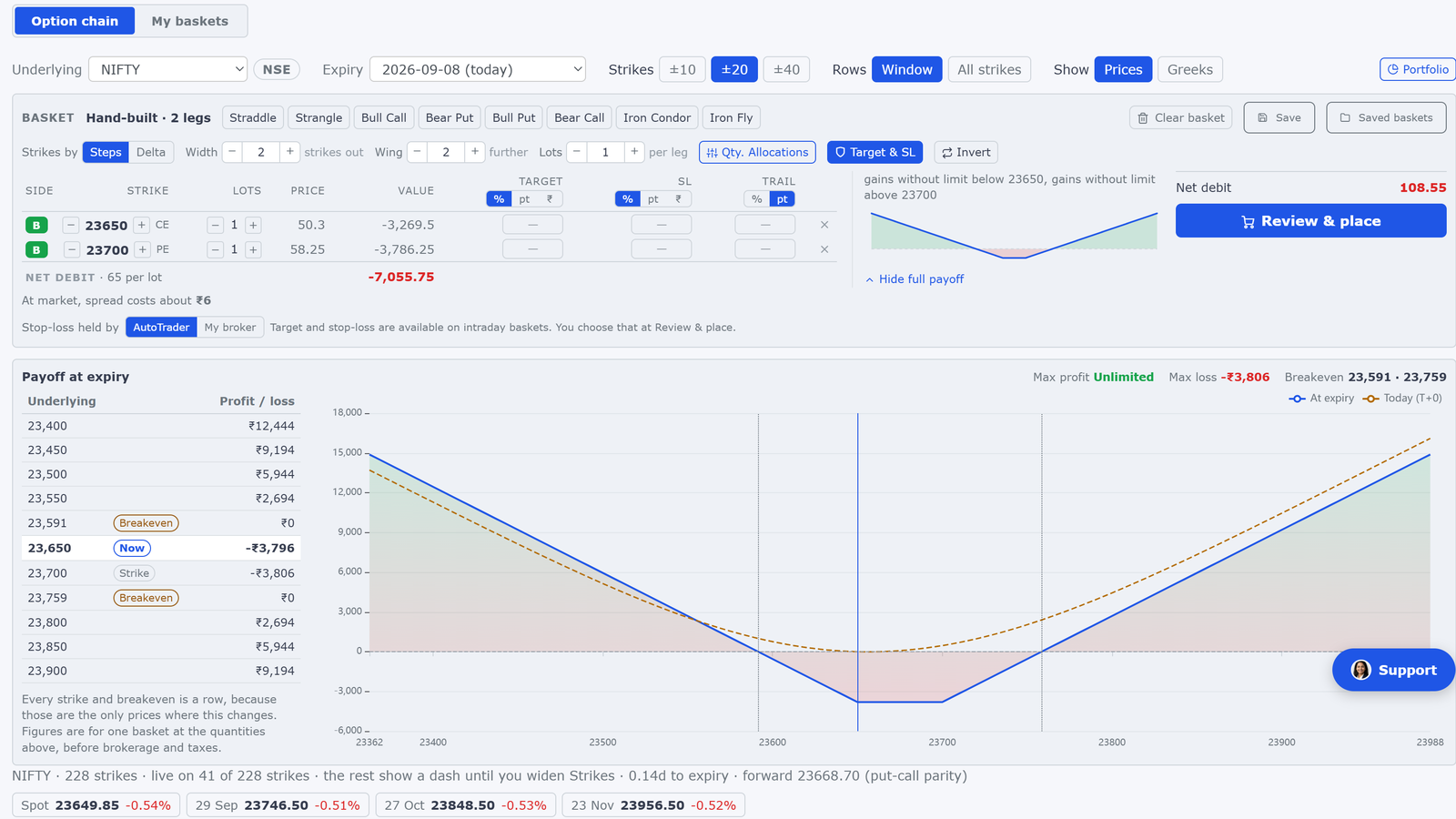
Pick an underlying and an expiry and read the chain live, with open interest, volume, bid, ask and last traded price on both sides. Build a leg by clicking buy or sell beside the strike you want.
Ready-made shapes
Pick a straddle, a strangle, an iron condor and others, and the legs are built around the current price for you. They are shapes to pick from, not recommendations.
Every leg, into many accounts, in one click
Place the whole structure into as many of your accounts as you choose, each account at its own size, with the available margin shown per account. Save a set of accounts and their sizes and reuse it.
Payoff before you place
See the profit or loss at every price, at expiry and as it stands today, with the maximum profit, the maximum loss and every breakeven called out.
What crossing the spread will cost
Every leg goes in at market, so the basket shows in rupees what crossing the spread is likely to cost, and tags a leg that is wide or not trading. It warns; it never blocks.
A target and stop-loss on each leg
Optional per-leg target, stop-loss and trailing step, set as a percentage, in points or as an exact price. Held at your broker, or by us — which works on every broker we support and is the only choice that can trail.
Save a structure and reuse it
A saved structure remembers its shape rather than its strike numbers, so it re-centres on the current price when you load it next week. One leg can be pinned to an exact strike if you want.
Buy legs go first
Bought legs are always sent before sold legs, whatever order you built them in, so a defined-risk structure is never left briefly as a naked short.
Risk management
Risk Management guide →Set a safety limit for an account and get an alert the moment it is crossed. You stay in control.
Daily loss limit and profit target
Set a maximum daily loss or a profit target for each account. When your live profit and loss crosses it during the day, you get an email alert.
Measure on all or only open positions
Choose whether the limit looks at all positions — the profit or loss from trades you closed today plus your open trades — or only your open trades. Set a default for every account and change it per account.
Alerts first, you decide
This is an early beta and sends alerts only. It never squares off or blocks your trades on its own — you get the warning and choose what to do.
Alert automation
Set up Alert Automation →Turn your chart or scan alerts into real orders.
Alerts to orders
Turn your TradingView alerts into live orders automatically, on one account or many. The action only runs when your alert fires. Chartink support is coming soon.
Options made easy
Send an option order or a full structure you choose — like a straddle or an iron condor — by giving the strike, expiry and size. You configure it; we build and place the legs.
You set the rule and the limits
You set up the alert, the rule that turns it into an order, and your own risk limit like a maximum loss. Nothing runs unless you have set it up and your alert fires.
APIs for developers
Read the API documentation →Build your own broker-independent system once, and it works everywhere.
Broker-independent trading API
One HTTP and REST API works across every supported broker, so you write your code once.
Build once, run on every broker
Any system you build on our broker-independent APIs automatically works with every broker we support. No broker-specific code to maintain.
Excel order tools
Place many orders at once from a spreadsheet, into one or more accounts across brokers. Copy one order to many accounts with different quantities per account, place a different order per account, and schedule orders to go at a set time like market open.
Excel order tools guideSecurity and control
Security and account control →You are connecting real broker accounts, so control sits with you.
OAuth login
Account owner can log in on the broker's own page where supported, so your credentials stay with the broker.
Two-factor authentication
Protect your account login with a 6-digit code from an authenticator app.
Keep your credentials hidden
Additional 2FA protection lets you share an account with your team while keeping your stored API credentials hidden.
Account owner delegation
Broker account owners get a "Kill Switch" to stop trading.
Stored in India, encrypted
Your data is held in encrypted form on servers in India.
Static IP for every account
Each account can get a dedicated static IP to meet broker requirements — ₹100 per month for IPv6 or ₹150 per month for IPv4, taxes included, against the up to ₹500 that other tools charge. On an IPv4 broker you can use your own IP for free if you prefer.
Static IP setup guideLarge-order safety check
A confirmation step before a very large order, so a slip does not become a costly mistake.
Auto pause on login failure
An account that keeps failing login is set non-live automatically until you fix the credentials.
You stay in control
Your API credentials are encrypted, your portfolio data is kept only for support, and our staff cannot trade your account. Every action is set up and triggered by you.
At a glance
The same capabilities in a quick, scannable form.
| Action | One account | Many at once |
|---|---|---|
| Place orders (market, limit, stop-loss, after-market) | ✓ Yes | ✓ Yes |
| Modify or cancel orders | ✓ Yes | ✓ Yes |
| Square-off positions | ✓ Yes | ✓ Yes |
| GTT orders (single and OCO) | ✓ Yes | ✓ Yes |
| Copy a master order to child accounts | — | ✓ Yes |
| Run orders from a TradingView alert | ✓ Yes | ✓ Yes |
| PMS copy | Master-child | |
|---|---|---|
| Where you place the order | In our terminal | In the master account (our terminal or your broker's) |
| Copy speed | Fastest, almost no lag | Slight lag |
| You see errors instantly | ✓ Yes | No, you watch the notifications |
| Bracket and cover orders | ✓ Yes | Not recommended |
| After-market orders (AMO) | ✓ Yes | No |
| Best for | Manual traders | An algo in one account, or trading on your broker's terminal |
| Type | What it does |
|---|---|
| Market and limit | Standard buy and sell orders at market price or a price you set. |
| Stop-loss | Sends an order when your trigger price is reached. Trailing option on supported orders. |
| After-market (AMO) | Place orders outside market hours for the next session. |
| GTT (single and OCO) | Set a trigger once and the order goes to the exchange when it is hit. OCO means one cancels the other. |
| Bracket and cover | Entry with a linked target and stop, where your broker supports it. |
| Square-off | Close a position or a whole portfolio, with the option to cancel its open orders. |
| Order slicing | Split large orders, including to stay within exchange freeze limits. |
| Item | Detail |
|---|---|
| API | One broker-independent HTTP and REST API across every supported broker. |
| SDKs | Java, Python, C# and Excel. |
| Excel tools | Place many orders at once from a spreadsheet, into one or more accounts across brokers. |
Works across your whole setup
- ✓ Over 40 Indian brokers supported, plus any broker on the Symphony XTS API.
- ✓ Works across the Indian stock exchanges.
- ✓ Full dark mode across the platform.
- ✓ Need something specific? New features and changes are delivered quickly, subject to approval.
Start your free month
Connect your accounts and use every feature for one month, free.
Common questions
Can I trade in many broker accounts at once?▾
Yes. You can place, modify, cancel and square-off across many accounts in a single action, and watch all of them on one live screen.
How many accounts can I watch on one screen?▾
There is no fixed limit. Multi-account traders, sub-brokers and portfolio managers use one screen to watch and act across all of their accounts at once.
Which order types are supported?▾
Market, limit, stop-loss and after-market orders, plus GTT (single and OCO), bracket and cover orders where your broker supports them, trailing stop-loss, square-off and order slicing. You can place them on one account or across many.
Does it support MTF (margin trading facility) orders?▾
Yes. You can place MTF orders, also called buy now pay later orders, on brokers that offer this facility. You set the product type to MTF, the same way you choose intraday, delivery or normal, and place the order on one account or across many.
Do you support cash, F&O and commodity?▾
Yes. You can monitor and trade across the cash, F&O and commodity segments on the Indian stock exchanges, and choose which segments copy trading applies to.
Does it support copy trading?▾
Yes, in two ways. With PMS copy you place an order in our terminal and it goes to the accounts or groups you choose. With master-child you trade in one master account and the order is copied to the child accounts in the background. You can scale each account, choose which segments copy, and set the times when copying is active. Master and child can be on different brokers. Both modes are included in your plan.
How do I set up copy trading?▾
First add all the broker accounts you want to trade: go to Accounts -> Trading Accounts and click Create for each one. Then choose a copy method. With PMS copy you place an order in our terminal and pick the accounts or groups to copy it into. With master-child you set up a master under Accounts -> Master Accounts, attach child accounts with a multiplier, and then trade only the master account. Both are included in your plan.
What is the difference between PMS copy and master-child copy?▾
Both copy one order into many accounts. With PMS copy you place the order in our terminal and pick the accounts or groups; it is the fastest and shows every result instantly. With master-child you trade in one master account, in our terminal or on your broker's own terminal, and we copy it to the child accounts in the background. PMS suits manual traders; master-child suits an algo running in one account or traders who prefer the broker terminal.
Which copy mode should I use?▾
Use PMS copy if you trade manually and want to catch any error at once. Use master-child if an algo trades one account, or you want to keep placing orders on your broker's terminal and have them copied in the background. You can use both at the same time for monitoring, but never run both for copying the same accounts, or orders will be copied twice.
Can I group my accounts?▾
Yes. You can group accounts by capital (for example a ₹10 lakh and a ₹20 lakh group), by broker, or by your own category such as cash, F&O or commodity. Give a group a quantity multiplier and the right quantity is worked out for each account, and you can trade or monitor a whole group at once.
Can I connect TradingView to my accounts?▾
Yes. You can connect your own TradingView alerts so they place orders in your accounts, on one account or many, including option structures you configure. An order is sent only when your alert fires, and you set up the rule yourself. Chartink support is coming soon.
Is there an API for programmers?▾
Yes. One broker-independent HTTP and REST API works across every supported broker, so you write your code once. There are SDKs for Java, Python, C# and Excel.
Can I place many orders at once, like a basket of orders?▾
In the web app you place one order into one or more accounts at a time. To place many orders in one go, we provide a separate Excel tool: you list the orders in a spreadsheet and send them all at once, into one or more accounts across brokers. You can give each account its own quantity and schedule the orders to go at a set time, like market open.
Where is my data stored and is it safe?▾
Your data is held in encrypted form on servers in India. Your API credentials are encrypted. Your portfolio data is kept for a limited period, only so we can solve your support questions quickly, and it is never sold.
Do I get a static IP, and can I use my own?▾
Yes. Each account can get a dedicated static IP, assigned for you in one click — you just whitelist it with your broker. It costs ₹100 per month for IPv6 or ₹150 per month for IPv4, inclusive of all taxes — the first month is charged from your wallet when the IP is assigned, and after that it renews every month, from your wallet or with your account recharge. A static IP belongs to one account, so each account that uses a static IP is billed for its own. Many other tools charge up to ₹500 per account per month for this or make you set up a proxy yourself. On an IPv4 broker you can use your own IP instead — we never charge for an IP you bring. It is not offered on IPv6.
Can you add a feature I need?▾
Often, yes. We have a rapid development cycle, so when users ask for a new feature or a change, we can build and ship it quickly. Requests are subject to approval, but if it helps traders and fits the product, we move fast.
Is there a free trial and what does it include?▾
Yes, on every broker. Every new account gets a free 1-month trial with every feature included. The trial covers the account licence; if you take a static IP from us, the IP charges apply separately (₹100 per month for IPv6, or ₹150 per month for IPv4, taxes included), and if you bring your own IP (IPv4 brokers only) there are no IP charges. After the trial it is between ₹295 and ₹495 per account per month, inclusive of all taxes.
Does the software trade on its own?▾
No. Stocks Developer is a software tool only. It does not give advice or make trading decisions for you. You set up and control every activity, and our staff cannot trade your account.
- brokers supported
- 40+ brokers supported
- in operation
- 8+ years in operation
- uptime
- 99.98% uptime
- data latency
- <100 ms data latency
Try every feature free for one month
Connect your accounts and see your whole portfolio on one screen. No charge for the first month, on every broker.
Sign up free