Last updated 20 June 2026
What to do when one of the broker has a problem?
Broker systems go down sometimes, and that is outside our control. If you manage accounts across different brokers and use the "All Accounts" view, one broken broker can make the whole screen keep loading. The fix is to create a group account for each broker. Then, when one broker has an issue, you can pick the working brokers from the dropdown and keep trading them.
Why the screen gets stuck
Broker systems break down on some days. It is rare, but it does happen. On such days, you have to wait for the broker to fix the issue on their side.
If you manage several trading accounts manually from our website, and your accounts are spread across different brokers, you may see the screen freeze or keep loading.
This happens when you have the “All Accounts” option selected. The system tries to load every account at once. Because one of your brokers is having an issue, the data for your other brokers does not load either.
Solution
- Create a group account for each of your brokers.
- When one broker has an issue, select the other brokers from the dropdown, as shown in the picture below.
- When you place an order, use group accounts.
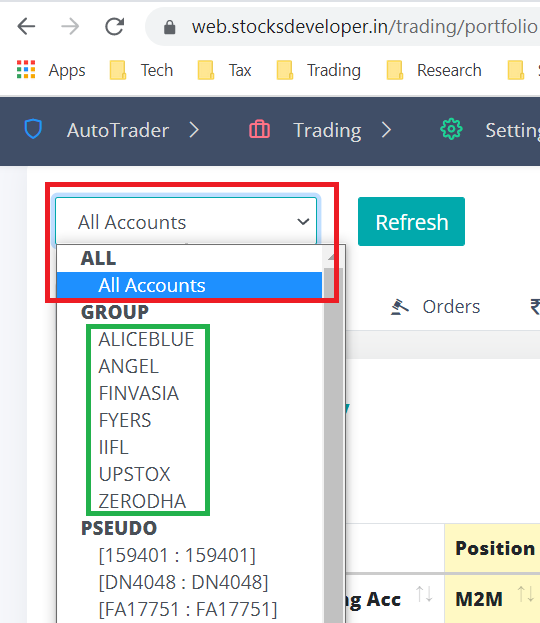
Grouping your accounts by broker keeps the working brokers usable while you wait for the affected broker to recover. You can check the full supported brokers list, and learn more about how to set up group accounts in the settings menu.
