Group Accounts
Bundle many accounts so one order or square-off hits them all in a click.
A group account is a collection of pseudo accounts, and a pseudo account points to a real trading account. So a group account is really a collection of trading accounts. It lets portfolio managers and manual traders place one order, or square off, across many accounts in a single click. Group accounts work on AutoTrader Web only and are not available for automation API users.
What is a group account?
A group account is a collection of pseudo accounts. A pseudo account is just a pointer to your real trading account. So a group account is, in effect, a collection of trading accounts.
Group accounts are available only to manual traders and portfolio managers who use the AutoTrader Web website. They are not available for automation API users.
Why use group accounts
- Portfolio managers can manage hundreds of trading accounts easily.
- You can group accounts by client profile (for example HIGH_PROFILE, LOW_PROFILE) or by category (for example EQUITY, DERIVATIVES, COMMODITY).
- You can copy a single order across different account groups. You can also set a different quantity per group (optional).
- You can square off an entire group in a single click.
One multiplier per group
Each group has one quantity multiplier. There is no per-account multiplier inside a group. To trade different sizes across your accounts, make groups by size:
- Put accounts that should trade the same size into one group.
- Give each group its own multiplier — for example Group A with multiplier
1and Group B with multiplier2. - Most traders need only a few groups, because several accounts usually share the same sizing.
- In the rare case where every account needs its own size, create one group per account, each with its own multiplier.
If you want automatic background copying with a per-account multiplier instead, use master-child copy — there the multiplier is set on each child account.
How to create a group account
- If you are a new user, first add your trading accounts.
- Open your group accounts. Menu: Accounts -> Group Accounts.
- Click the Create button to start a new group.
- Give the group a name and a description.
- The screen shows your available pseudo accounts. Click the (+) button to add an account to the group.
- To remove an account, click the (-) button.
- Click Save to save the group.
Demo video
Screenshots
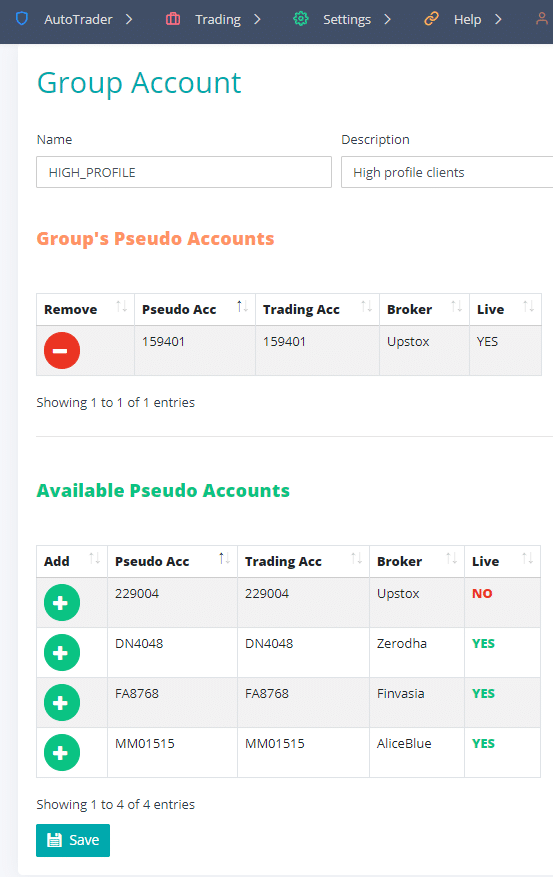
Create Group Account
Frequently asked questions
How are group accounts different from master accounts?▾
They belong to two different copy methods, and both copy your order automatically — you never re-enter it in each account by hand. A group account is part of PMS copy: you bundle several accounts together once, then place an order to that group in our terminal and it goes to every account in the group in a single click. A master account is part of master-child copy: you trade only the master account (in our terminal, on your broker's own terminal, or from an algo) and the order is copied to the child accounts in the background. So a group is something you trade into on demand, while a master account keeps copying on its own. You can use both together — for example, run master-child for background copying, and still use the PMS dashboard and your groups to monitor and place custom trades into the same accounts.
Do I have to place the order separately in each account of a group?▾
No. That is the whole point of a group. You place the order once and pick the group, and the system copies it to every account in the group at the same time. You can also give the group a quantity multiplier so each account's quantity is sized automatically.
Is creating a group a one-time task?▾
Yes. You set up a group once from Accounts -> Group Accounts. After that it is ready whenever you trade — you just select it while placing an order. You can edit the group later to add or remove accounts.
Can I set a different quantity multiplier for each account inside a group?▾
No. The quantity multiplier is set on the group, not on each account inside it. To trade different sizes, make groups by size: put accounts that should trade the same size into one group, and give each group its own multiplier — for example Group A with multiplier 1 and Group B with multiplier 2. Most traders need only a few groups, because several of their accounts usually share the same sizing. In the rare case where every account needs its own size, create one group per account, each with its own multiplier. If you want automatic background copying with a per-account multiplier instead, use master-child copy — there the multiplier is set on each child account.
Next steps
Thanks for the feedback. Still stuck? Contact support.
Last updated 16 July 2026
