Trading
Monitor and trade across all your broker accounts from one portfolio dashboard.
The Trading menu is the main screen for monitoring and trading across all your accounts at once. It opens a single Portfolio dashboard with nine tabs, so you can place orders and track positions for every connected account from one place. Prices tick live on their own; the tables refresh when you ask — with the Refresh button at the top, the round refresh button that appears at the bottom-right when you scroll down, or the r key in Keyboard mode.
This menu gives you the trading options for your accounts.
Portfolio sub-menus
The Portfolio screen has these sections:
Options
The Options screen is separate from the Portfolio. It shows a live option chain where you can build a multi-leg strategy and place every leg into many accounts at once. It is open to every user and is still marked beta while we finish testing it.
Quarterly Settlement
The Quarterly Settlement screen is also separate from the Portfolio. Before your broker’s fund settlement date, it buys a liquid ETF with the idle cash in all your accounts in one click, and sells the units back in one click when you want the cash.
Prefer the keyboard? See Keyboard Shortcuts to place orders and drive the tables without the mouse.
New to any of the words on these screens? Trading Terms Explained covers order, trade, position, holding, margin and the order types in plain English.
Which tab you start on
The Portfolio opens on the tab you use most, rather than always starting on Summary. If you begin your day on Positions, that is what loads first. If Summary is what you use most, nothing changes for you.
When a tab needs a moment to fetch data, it tells you so and shows how many of your accounts have loaded, so you always know it is working rather than stuck.
Refreshing the data
Prices on the screen tick live on their own. The tables — positions, orders, holdings, margins — refresh when you ask, so nothing you are working on is ever wiped out mid-action:
- Click the Refresh button at the top of the Portfolio.
- Scrolled down while monitoring? A small round refresh button appears at the bottom-right of the screen (just above the Support chat button). One click refreshes the tab you are on, from wherever you are — no need to scroll back up.
- With Keyboard mode on, just press r.
The floating refresh button and the r key work on every tab except MarketWatch (which updates live on its own) and Trade (so an order you are filling in is never disturbed).
Trade into multiple accounts
The Trading menu is the main interface for monitoring and trading into all of your accounts from a single dashboard. You can watch every account and send orders without switching screens.
Walkthrough videos:
Portfolio screen tabs
The screen has nine tabs. Each tab is explained in detail in its own chapter.
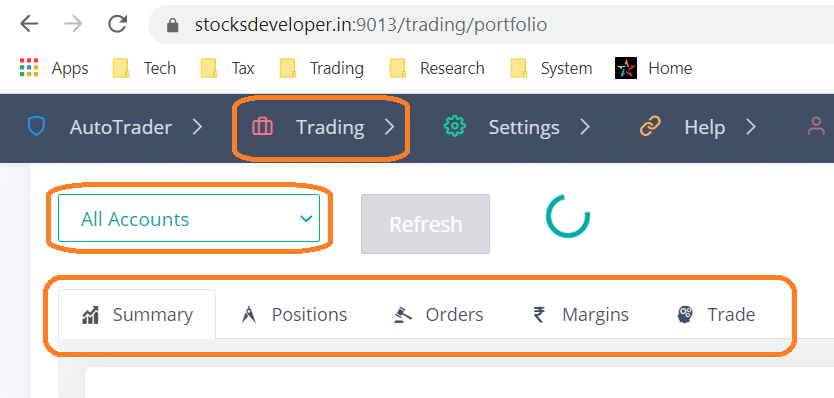
For details on adding accounts before you trade, see Trading Accounts. To learn how the same actions work across brokers, see Broker Independence.
Frequently asked questions
Why does the Portfolio screen not refresh automatically?▾
This is by design, and it protects your work. An automatic refresh could wipe out things you are in the middle of — rows you have selected for a square-off or a cancel, or filters you have applied — and every refresh also asks your broker for fresh data, so refreshing only when you need it keeps things fast. Prices still tick live on their own. When you want fresh tables, click the Refresh button at the top, click the round refresh button that appears at the bottom-right when you scroll down, or press r with Keyboard mode on.
Why does the Portfolio open on Positions (or another tab) instead of Summary?▾
Because that is the tab you use most. The Portfolio remembers the tab you open most often and starts you there, so the screen you actually want is the one that loads. If you mostly use Summary, it keeps opening on Summary. Every tab is still one click away, and nothing else about the screen changes.
One of my Portfolio windows says live updates are running in my other windows. What does that mean?▾
Live prices flow over a live connection, and one login can keep a limited number of these running at once. If the Portfolio is open in more windows than that, the newest one pauses live price ticking and tells you how many other windows are already streaming. Nothing is broken in that window — tables, orders and buttons all work normally, and Refresh still brings current data. A window you are not looking at gives up its slot by itself after about a minute, so the notice usually clears on its own.
The Portfolio screen shows an error for one of my accounts, but not the reason. How do I find the real cause?▾
Place a dummy order on that account and read the message your broker returns for it. Reading a portfolio is a light request, and many brokers reply to a failed read with almost no detail, so the screen can only show a general error. An order is checked much more strictly, so a rejected order comes back with the broker's own clear message. On the Trade tab select only the failing account, place a dummy order, then read the Reject. Reason column on the Orders tab — that text is the real error. It is almost always an account that is not set up correctly, most often a static IP that is not registered with the broker.
What is a dummy order, and how do I place one?▾
A dummy order is a small test order placed only to see how your broker replies. It is a real order sent to your broker, so you set it up in a way that it cannot execute: pick any stock with quantity 1 (or an option contract with quantity 1 lot), Product Type INTRADAY, Order Type LIMIT, side BUY, and a limit price well below the current market price. It then simply rests unexecuted, and you can cancel it from the Orders tab whenever you want. Keep the quantity at the minimum and the price far from the market price. It is the quickest way to confirm an account can really trade, and to read the exact error when it cannot.
Next steps
Thanks for the feedback. Still stuck? Contact support.
Last updated 30 September 2026
