Symphony XTS
Connect a Symphony XTS based broker account to AutoTrader Web.
Symphony XTS is a common API used by many Indian stock brokers. If your broker runs on XTS, get the App Key and App Secret for the Interactive API package, then add the account in AutoTrader Web under Accounts -> Trading Accounts. Both the XTS RETAIL and PRO/DEALER APIs are supported.
Symphony XTS is an independent API offered by many stock brokers in India. If your stock broker supports XTS, you can use your broker’s trading account with our system.
We support both the XTS RETAIL API and the PRO/DEALER API of XTS.
Demo video
Step 1 – Obtain API details
You need to get XTS API details from your stock broker. We need two things: the App Key and the App Secret. If you already have these, skip to Step 2.
Brokers hand over these details in one of two ways:
- The broker gives you the App Key and App Secret directly. If so, go to Step 2.
- The broker gives you access to their Symphony API dashboard. If so, follow the dashboard steps below.
Create an app in the Symphony API dashboard
If you were given dashboard access, do the following:
- You may already have a default application created (see screenshot 1 below). In that case, move to Step 2.
- If you do not have a default app, go to the menu (My app -> Create New Application). See screenshot 2 below.
- Fill in App Information:
- App Name – Stocks Developer
- App Description – Stocks Developer
- API Package – select Interactive
- Fill in Basic Information:
- Company Name – Stocks Developer
- Redirect URL –
https://webx.stocksdeveloper.in/auth/xts
- Once your app is created, you will get the App Key and App Secret.
Note: If you use multiple vendors with your XTS account, you must create a separate app for each one.
Step 2 – Add your account in our system
- Go to the AutoTrader Web menu (Accounts -> Trading Accounts).
- Click the Create button.
- Select your Broker.
- Note: If your broker supports XTS but you do not see their name, please contact support. They will help you.
- Select the appropriate XTS trading platform.
- Enter the Interactive App Key.
- Enter the Interactive App Secret.
- Give a Nickname to your account.
- Click Validate & Save.
Supported brokers on the XTS API
These Symphony XTS brokers are supported, in alphabetical order:
- 5paisa
- AC Agarwal
- Ambalal
- Anand Rathi
- ATS (Aditya Trading Solutions)
- Axis
- Eureka
- IIFL
- Jainam
- Motilal
- Rmoney
- Share India
- SMC
- SW Capital
- Tradeswift
- Wisdom Capital (Ashlar)
- Zebu
Brokers we can add on request
The brokers below are not currently added in our system. But if your broker supports the Symphony XTS API and is on this list, we can onboard it for you on request, subject to our terms and conditions. Please speak to our support team and we will help you add it.
If your broker supports the XTS API but you do not see its name anywhere on this page, contact us as well — we can still help.
The list is sorted in alphabetical order.
- Ajay Natwarlal Security
- Arham Share Pvt. Ltd.
- Arham Wealth Management Pvt Ltd.
- Asiatic Stock & Securities LTD
- BP Wealth
- Composite Edge
- DB International
- Firstock
- GRD Securities
- Growth Securities
- Gyandeep Stocks Pvt Ltd
- Jaypee Capital Services LTD
- JM Financial
- Kredent Trading
- M Prasad & Co. Ltd.
- Marck Securities
- Marwadi
- Nirmal Bang
- PRB Securities
- RMoney Raghunath Money
- ShareIndia
- Shri Parasram Holdings Pvt. Ltd.
- Transglobal Trade
- Trustline
- Yashwi Securities
Screenshots
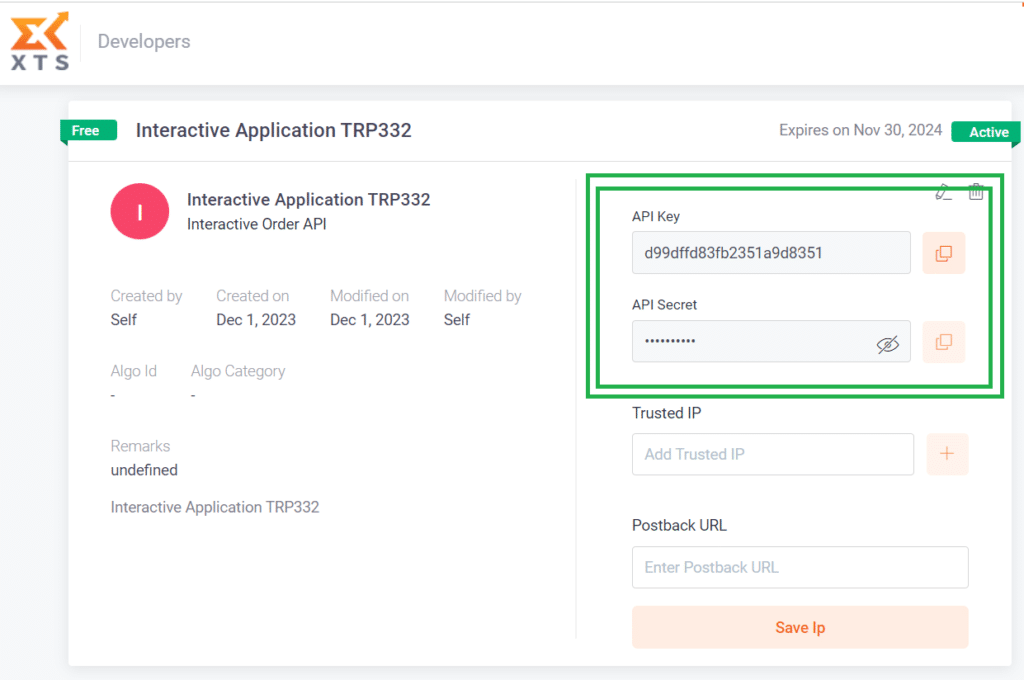
1. XTS – API Key & Secret
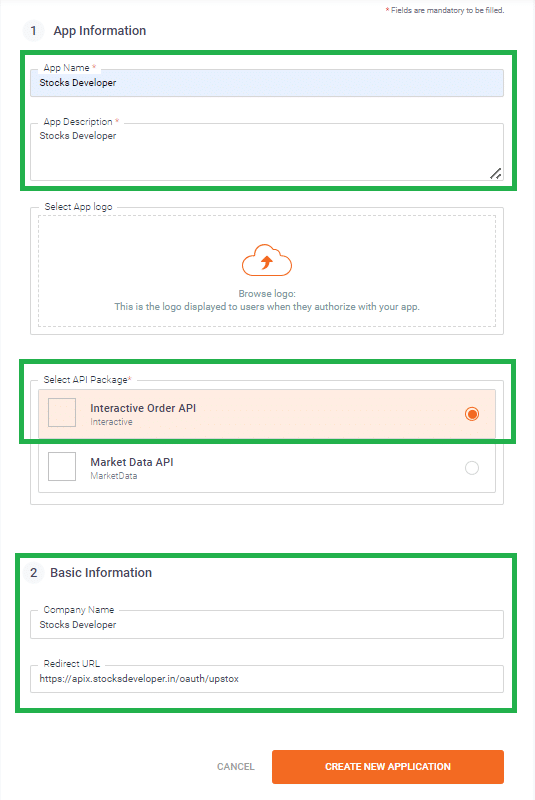
2. XTS – Create App
Static IP Setup
The static IP setup is the same for every broker. Follow the full guide here:
→ Static IP Setup — set up a static IP or bring your own (BYOIP)
Bracket and cover orders on Symphony XTS
Symphony XTS offers bracket and cover orders of its own, and you can carry on using them — they are still in the Variety list and nothing about them changes. AutoTrader has its own versions too, and they are worth knowing about because they behave the same way on every broker you trade.
An AutoTrader bracket order (AT_BO) attaches a target and a stop-loss to your Symphony XTS order, with an optional trailing stop that follows the price in your favour and never moves back. An AutoTrader cover order (AT_CO) is the same thing with a stop-loss only. Your entry reaches Symphony XTS as an ordinary intraday order, and AutoTrader Web watches the price and sends the closing order when your level is reached. Use it when you want a trailing stop that behaves identically across brokers, when you want to change your levels after placing, or when you trade several brokers and want one set of rules.
Place one from the order window, from your own code, or from a chart alert. It is intraday only, it does not give you the extra intraday margin some brokers give on their own bracket orders, and the position is squared off automatically a short while before the market closes.
Read the risk before you use it. A stop-loss decides when we try to exit — it does not decide the price you get. A sudden move can take the price straight past your level, so your loss can be larger than the stop-loss you set. The full explanation, and the one-time terms you agree to before your first one, are on Bracket & Cover Orders.
Frequently asked questions
What is the Symphony XTS API?▾
The Symphony XTS API is a trading API developed by Symphony Fintech. Many Indian brokers run on it.
Which Symphony XTS APIs does AutoTrader Web support?▾
Both sets: the XTS Retail API (the front-end API) and the XTS Prop / Dealer / Institutional API.
My broker is not listed. Can I still use it if it supports Symphony XTS?▾
Check with your broker to see if they offer the Symphony XTS API. If they do and your broker is not listed on our website, contact our support team and we will help you connect it.
Can I monitor and copy trade across multiple accounts on a Symphony XTS broker?▾
Yes. With any supported XTS broker you can connect one or many accounts, monitor live P&L, holdings and positions on one screen, and copy trade across accounts — PMS copy and master-child — all under your control.
Can I place a bracket order on Symphony XTS?▾
Yes, in two ways. You can use Symphony XTS's own bracket and cover orders, which are unchanged, or an AutoTrader bracket order (AT_BO) or cover order (AT_CO), which behave the same way on every broker. Ours adds a trailing stop everywhere and lets you change your target and stop-loss after placing. It is intraday only and gives no extra margin, and a sudden price move can still take your exit past the level you set.
Next steps
Thanks for the feedback. Still stuck? Contact support.
Last updated 8 August 2026
