Nicknames
Give each trading account an easy name so your strategy code stays the same across brokers.
A nickname is an easy-to-remember name for a real trading account. In our APIs the same thing is called a pseudo account, so nicknames are pseudo accounts. Our API functions use the nickname (pseudo account), not the broker account, so your strategy code stays the same across brokers. A nickname is created automatically for each trading account, and you rename it or mark it live or non-live from the Trading Accounts screen.
What is a nickname?
A nickname (called a pseudo account in our APIs) is a dummy account created to achieve broker independence. Our API functions accept a nickname, which in turn points to an actual trading account.
This lets you write strategy code once and reuse it across brokers, because the code talks to the nickname instead of broker-specific details. For more on the idea, see Pseudo Account.
A nickname is created automatically for each trading account. The everyday actions — renaming a nickname and marking it live or non-live — are done from the Trading Accounts screen.
Note: The trading account creation screen has a checkbox to create a nickname. If you tick it while adding the trading account, you can set a custom nickname right away.
How to create a nickname
A nickname is created for you automatically when you add a trading account. To set a custom name instead of the default, tick the nickname checkbox on the Create Trading Account screen and type the name you want.
- For ease of use, give the same name as your trading platform’s login id, or any easy-to-remember name.
- The nickname is mapped to that one trading account.
Note: One nickname maps to only one trading account.
Rename a nickname
You can rename a nickname any time from the Trading Accounts screen. In the Nickname column, click the pencil icon, type the new name and confirm.
Renaming is useful for portfolio managers — a meaningful name is far easier to remember than a login id.
Important: The nickname is the name your API, algo or Excel code uses to place orders. If you rename it, update your code to the new name as well, or your orders will fail.
Mark a nickname live or non-live
To enable or disable trading into an account, mark it live or non-live from the Trading Accounts screen. Select the account and click Live or Non-live.
Delete a nickname
A nickname is removed when you delete its trading account. Deleting the trading account frees up its nickname, so you can use that name again for a different account.
Validate all accounts
To validate the login credentials of all accounts, click the Validate All button. If you manage many accounts, it is a good idea to validate all of them before you begin your trading day.
Sometimes an account shows “Logged Out” or “Error”. Click Validate All and the system logs in to all your LIVE accounts and checks them. On success the status turns to “LOGGED IN”. If there is a problem, the system shows the error message — please take the corrective action, or ask our support chatbot if you are unsure.
Screenshots
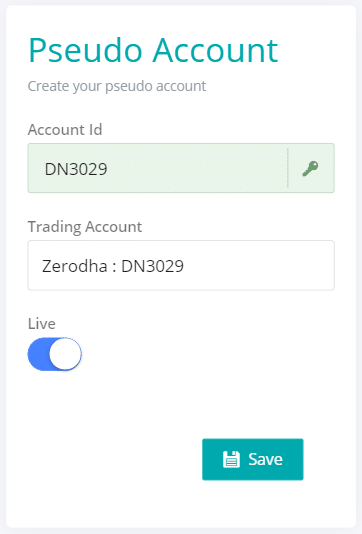
Create a nickname
Next steps
Thanks for the feedback. Still stuck? Contact support.
Last updated 23 June 2026
