Motilal Oswal
Add and validate your Motilal Oswal account in AutoTrader Web.
Motilal Oswal needs a static IP — the developer portal asks for a Primary IP, and Motilal checks the IP on every request. Motilal Oswal is IPv4 only, so your static IP options are a Premium static IPv4 at 250 rupees per month (2-month minimum to start), a Standard static IPv4 at 150 rupees per month, or bring your own IP, which is free. Get the IP first with the Static IP button in AutoTrader Web, then create your API on the Motilal developer portal and copy its TOTP Key, API Key and API Secret. Then go to Accounts -> Trading Accounts, create an account with the MOTILAL_API_V7 platform, fill in those details, and click Validate then Save.
This guide shows how to add a Motilal Oswal account in AutoTrader Web.
Demo video
Which API to use
Motilal offers two different APIs:
| API | When to use |
|---|---|
| Motilal Open API | The default. Follow the steps below. |
| Symphony XTS API | See the Symphony XTS guide. |
Step 1: Get your static IP first
A Motilal Oswal account needs a static IP. The Motilal API portal asks you for a Primary IP while creating the API, and Motilal checks the IP on every request afterwards — so get the IP before you create the API, not after.
Motilal Oswal is IPv4 only (it does not support IPv6), so the ₹100 IPv6 option does not apply here. In AutoTrader Web, go to Accounts → Trading Accounts, start the account (or open it if it already exists), click the Static IP button and pick one:
| Option | Price |
|---|---|
| Buy Premium Static IPv4 from us (recommended) — faster and a little more reliable | ₹250 per month, 2-month minimum to start |
| Buy Standard Static IPv4 from us — an IP from our pool | ₹150 per month |
| Bring your own IP (BYOIP) — your own static IP proxy from a proxy vendor | Free |
All prices are inclusive of all taxes. Copy the IP you are given — you will paste it into the Primary IP field in Step 2.
A Standard pool IPv4 or your own IP can be taken before you save the account, so you can whitelist it with Motilal right away. A Premium static IPv4 needs the account saved first. Full detail: Static IP Setup.
Step 2: Create the API
- Go to the Motilal Oswal Trading API portal.
- Login with your Motilal credentials.
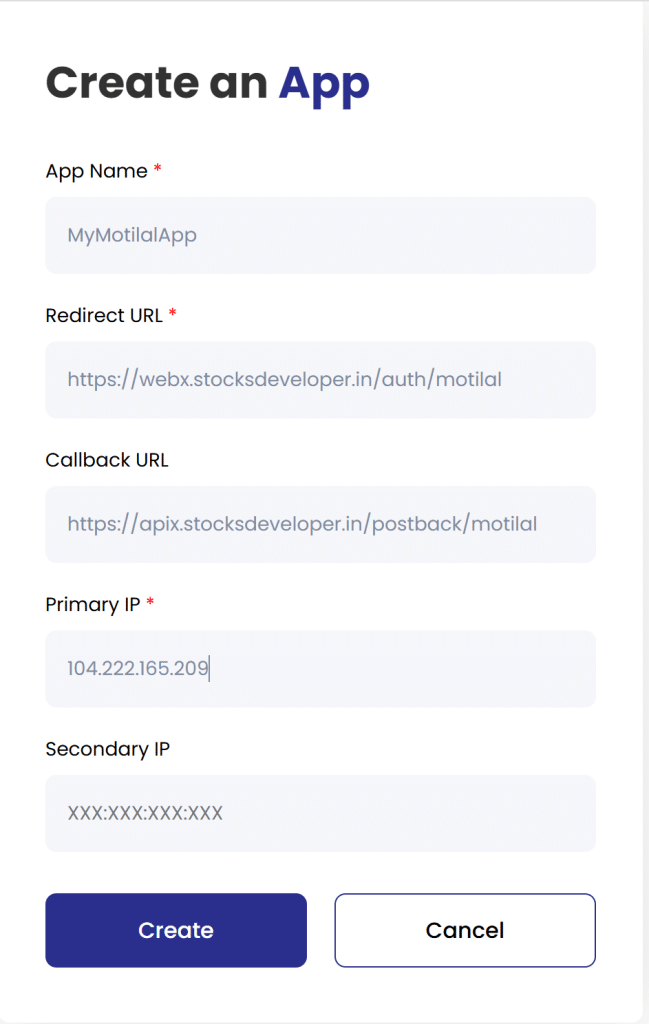
- Click the Create an API button (see screenshot below).
- App Name: MyMotilalApp
- Redirect URL:
https://webx.stocksdeveloper.in/auth/motilal - Call Back URL:
https://apix.stocksdeveloper.in/postback/motilal - Primary IP: paste the static IP you got in Step 1
- Secondary IP: <keep it blank>
- Get your TOTP Key:
- On the Dashboard, click “My APIs”.
- You will find the TOTP Key here.
Step 3: Add the Trading Account
- Go to the AutoTrader Web menu (Accounts -> Trading Accounts).
- Click the Create button.
- Select Broker as Motilal.
- Select MOTILAL_API_V7 as the platform.
- Enter your Motilal login id.
- Enter your Motilal password.
- Enter the TOTP Key obtained in the previous step (see screenshot below).
- Enter your Date of Birth in this format: dd/mm/yyyy — day first, then month, then the four-digit year. So 9 March 1985 is
09/03/1985, not03/09/1985. - Enter your API Key (see screenshot below).
- Enter your API Secret.
- Click Validate, then Save.
That’s it. Your Motilal Oswal account is now added. Before you start, read these known limitations.
Day first in the Date of Birth. This is the one step people get wrong most often. A date typed month first, such as 03/09/1985, is still a real date (3 September), so it saves without a warning and Motilal Oswal then refuses the login with Two Factor Authentication Failed. If you see that error, see Motilal Oswal login errors.
Screenshots
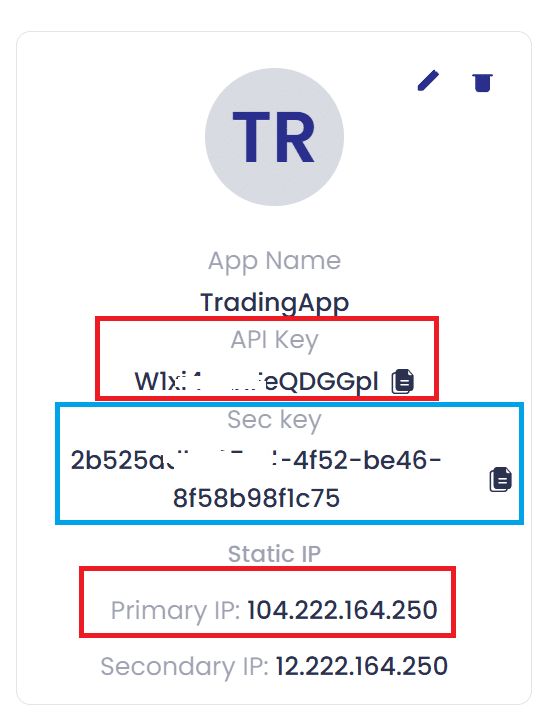
Motilal API Keys
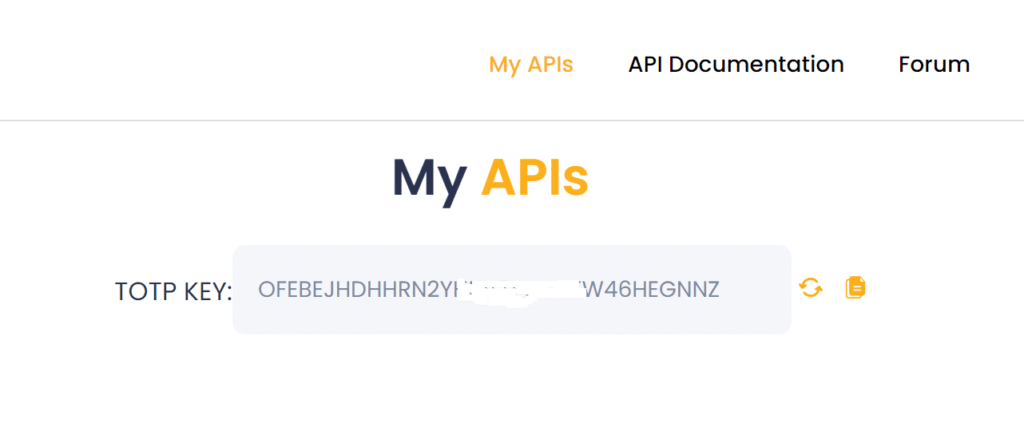
Motilal API – TOTP Key
More on the static IP
Step 1 above covers what you need for Motilal Oswal. For the full detail — how the charge and renewal work, when you can take the IP before saving the account, and how to bring your own IP — see:
Static IP Setup — set up a static IP or bring your own (BYOIP)
If Motilal rejects the connection because the IP is not registered, see Broker rejects your IP. With Motilal this can show up as a connection or timeout failure rather than a clear IP message.
Bracket and cover orders on Motilal Oswal
Motilal Oswal does not offer a bracket order through the interface AutoTrader Web connects to, so you cannot place one on Motilal Oswal directly. You are not doing anything wrong if you went looking for it and could not find it — many Indian brokers withdrew bracket orders in 2020 and never brought them back.
You can place one anyway. An AutoTrader bracket order (AT_BO) attaches a target and a stop-loss to your Motilal Oswal order, with an optional trailing stop that follows the price in your favour and never moves back. An AutoTrader cover order (AT_CO) is the same thing with a stop-loss only. Your entry reaches Motilal Oswal as an ordinary intraday order — the one thing every broker accepts — and AutoTrader Web watches the price and sends the closing order when your level is reached.
Place one from the order window, from your own code, or from a chart alert. It is intraday only, it does not give you the extra intraday margin some brokers give on their own bracket orders, and the position is squared off automatically a short while before the market closes.
Read the risk before you use it. A stop-loss decides when we try to exit — it does not decide the price you get. A sudden move can take the price straight past your level, so your loss can be larger than the stop-loss you set. The full explanation, and the one-time terms you agree to before your first one, are on Bracket & Cover Orders.
Frequently asked questions
Does AutoTrader Web support Motilal Oswal?▾
Yes. Motilal Oswal is fully supported. You can connect one or many Motilal Oswal accounts and monitor live P&L, holdings and positions, place and manage orders, and copy trade across all of them from one screen, on web or mobile.
Can I copy trade with Motilal Oswal?▾
Yes. You can copy trade with Motilal Oswal in two ways — PMS copy from our terminal and master-child copy in the background — across accounts and brokers, with per-account sizing. You set up and control everything.
Can I manage multiple Motilal Oswal accounts together?▾
Yes. Add as many Motilal Oswal accounts as you like and see consolidated P&L, holdings and positions live, and trade across all of them at once.
How much does it cost to use Motilal Oswal with AutoTrader Web?▾
AutoTrader Web is ₹295 to ₹495 per account per month, with all taxes included, and a free 1-month trial. A Motilal Oswal account also needs a static IP, and Motilal Oswal is IPv4 only, so budget ₹150 to ₹250 per month on top: a Standard static IPv4 is ₹150 per month, and a Premium static IPv4 is ₹250 per month (faster and a little more reliable, 2-month minimum to start). Bringing your own IP is free. All prices include tax. If Motilal Oswal charges separately for API access, that fee is set by the broker.
Does Motilal Oswal need a static IP, and which type?▾
Yes. Motilal Oswal's developer portal asks for a Primary IP and Motilal checks the request IP, so the account needs a static IP registered with them. Motilal Oswal is IPv4 only — it does not support IPv6 — so the ₹100 IPv6 option does not apply. Click the Static IP button while editing the account and pick one of three: a Premium static IPv4 (₹250 per month, 2-month minimum to start), a Standard static IPv4 (₹150 per month), or bring your own IP (free). Take the IP first, then paste it into the Primary IP field on the Motilal developer portal and leave Secondary IP blank. If the IP is not registered, Motilal blocks the connection — and it can look like a timeout rather than a clear IP error.
Can I place a bracket order on Motilal Oswal?▾
Not a Motilal Oswal bracket order — Motilal Oswal does not offer one through the interface we connect to. You can place an AutoTrader bracket order (AT_BO) on your Motilal Oswal account instead. It attaches a target, a stop-loss and an optional trailing stop to the order, and it works because your entry goes to Motilal Oswal as an ordinary intraday order while AutoTrader Web watches your levels. It is intraday only and gives no extra margin, and a sudden price move can still take your exit past the level you set.
Next steps
Thanks for the feedback. Still stuck? Contact support.
Last updated 8 October 2026
